JSON to Markdown Table Converter
Convert JSON arrays or objects into Markdown tables. Runs locally in your browser.
Accepts an array of objects, a single object, or an object containing an array.
Table preview
Preview of the generated tableThe rendered table preview will appear here.
Your JSON is processed in this browser and is not sent to KingsTools.
JSON is a common format for exchanging data between APIs, applications, and services. However, raw JSON can be difficult to scan when you need to compare records, document API responses, or explain data structures in a GitHub README. Converting JSON to a Markdown table makes simple datasets easier to read without requiring a separate spreadsheet or database viewer.
This guide explains how to convert JSON to Markdown table format using Python and JavaScript. It also covers missing keys, nested objects, special characters, and practical considerations for generating tables that render correctly in GitHub, GitLab, and other Markdown-compatible environments.
How to Convert JSON to a Markdown Table
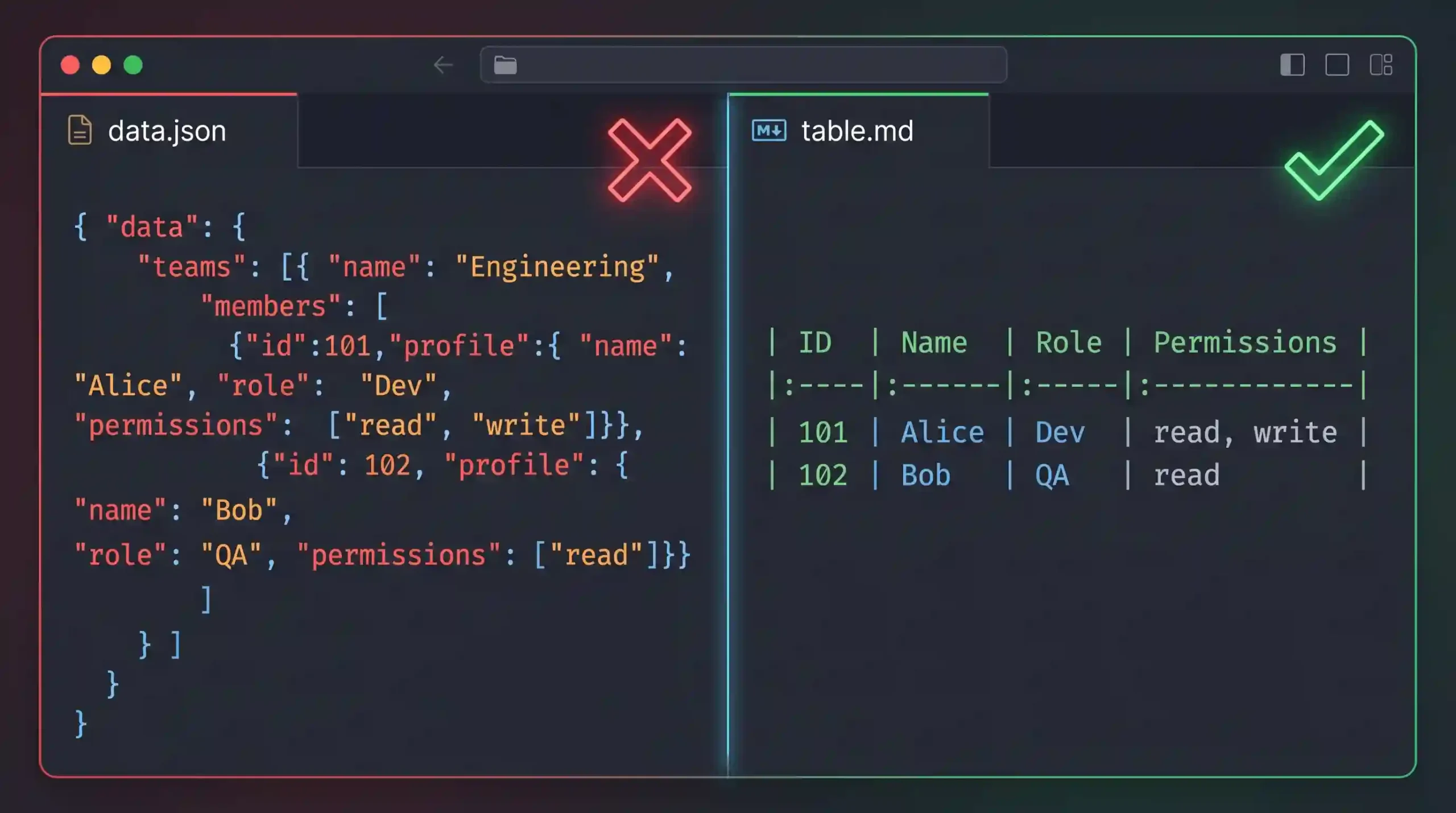
A Markdown table uses a header row, a separator row, and one row for each record. When your JSON contains an array of objects, the object keys can become the column headings and their values can become the table cells.
Consider this JSON array:
[
  {
    "id": 101,
    "endpoint": "/users",
    "status": "active"
  },
  {
    "id": 102,
    "endpoint": "/posts",
    "status": "deprecated"
  }
]
The corresponding Markdown table is:
| id  | endpoint | status     |
| --- | ---      | ---        |
| 101 | /users   | active     |
| 102 | /posts   | deprecated |
In this example, each object becomes a row, while id, endpoint, and status become column headings.
For a small, uniform array, this conversion is straightforward. For larger datasets, the script must also account for inconsistent keys, nested values, and characters that can interfere with Markdown formatting.
Prepare and Validate JSON Before Conversion
Before generating a table, make sure the input is valid JSON and has the structure your conversion process expects. A valid JSON document is not necessarily a valid table input. For example, a single object, a string, or an array of numbers needs different handling from an array of objects.
Common input problems include:
- Missing commas or quotation marks.
- Incomplete JSON copied from a log or interrupted API response.
- An HTML error page returned instead of JSON.
- An array containing values with different structures.
- Nested objects that need flattening or serialization.
If parsing fails, investigate the original payload before converting it. The guide to fixing an unexpected token in JSON explains one common parsing error, while the article on unexpected end of JSON input covers incomplete data.
Once the input has been validated, decide how the converter should handle missing properties, null values, nested structures, and long strings. Consistent rules make the resulting table easier to understand.
Handle Missing Keys and Inconsistent Objects
JSON arrays do not require every object to contain the same keys. Consider this example:
[
  {"name": "Alice", "role": "Admin"},
  {"name": "Bob", "role": "User", "city": "Lahore"}
]
If the converter extracts column headings only from the first object, it will miss the city property. A better approach is to collect the unique keys from every object before generating the table.
The result should look like this:
| name  | role  | city   |
| ---   | ---   | ---    |
| Alice | Admin |        |
| Bob   | User  | Lahore |
The empty cell indicates that Alice’s object does not contain a city property. This is different from a property explicitly set to null or an empty string. If that distinction matters for your documentation, define a consistent representation for each case.
Collecting all keys first also prevents data from later objects from being silently discarded. For large datasets, this approach requires an initial pass over the array to identify the columns.
Convert JSON to Markdown Table Using Python
Python’s built-in json module provides the parsing and serialization functions needed for a basic converter. The following implementation supports arrays of objects, gathers keys across all records, handles nested values, and escapes pipe characters that would otherwise break table cells.
import json


def escape_markdown(value):
    """Prepare a value for use inside a Markdown table cell."""
    return (
        str(value)
        .replace("\\", "\\\\")
        .replace("|", "\\|")
        .replace("\r\n", "\n")
        .replace("\r", "\n")
        .replace("\n", "<br>")
    )


def json_to_markdown_table(data):
    if not isinstance(data, list) or not data:
        raise ValueError("Input must be a non-empty array of objects.")

    if not all(isinstance(item, dict) for item in data):
        raise ValueError("Every array element must be an object.")

    headers = list(dict.fromkeys(
        key for item in data for key in item.keys()
    ))

    if not headers:
        raise ValueError("The objects contain no keys to display.")

    def cell(value):
        if isinstance(value, (dict, list)):
            value = json.dumps(
                value, ensure_ascii=False, separators=(",", ":")
            )
        elif value is None:
            value = "null"
        elif isinstance(value, bool):
            value = str(value).lower()

        return escape_markdown(value)

    header_row = "| " + " | ".join(
        escape_markdown(header) for header in headers
    ) + " |"

    separator_row = "| " + " | ".join(
        "---" for _ in headers
    ) + " |"

    rows = []
    for item in data:
        values = [
            cell(item[header]) if header in item else ""
            for header in headers
        ]
        rows.append("| " + " | ".join(values) + " |")

    return "\n".join([header_row, separator_row, *rows])


raw_json = '''
[
    {"name": "Alice", "role": "Admin"},
    {"name": "Bob", "role": "User", "city": "Lahore"}
]
'''

data = json.loads(raw_json)
print(json_to_markdown_table(data))
The function follows a few important rules:
- Input validation: It rejects empty arrays and arrays containing non-object elements.
- Complete headers: It gathers unique keys from all objects while preserving their first-seen order.
- Missing properties: It leaves the corresponding cell blank when a key is absent.
- Null and Boolean values: It represents them as
null,true, orfalse. - Nested data: It serializes nested arrays and objects into compact JSON strings.
- Markdown characters: It escapes pipe characters and replaces line breaks with HTML line-break tags.
The function is intended for ordinary JSON values and flat tables. If you need to preserve complex nested relationships, consider flattening the data into separate columns or tables instead of placing every nested structure into one cell.
Convert JSON to Markdown Table Using JavaScript
JavaScript is useful when you want to generate Markdown during a build process, inside a Node.js script, or as part of a documentation workflow. The following function applies similar rules to the Python example.
function escapeMarkdown(value) {
  return String(value)
    .replace(/\\/g, "\\\\")
    .replace(/\|/g, "\\|")
    .replace(/\r\n|\r|\n/g, "<br>");
}

function convertJsonToMarkdownTable(data) {
  if (!Array.isArray(data) || data.length === 0) {
    throw new Error("Input must be a non-empty array of objects.");
  }

  if (!data.every(item =>
    item !== null &&
    typeof item === "object" &&
    !Array.isArray(item)
  )) {
    throw new Error("Every array element must be an object.");
  }

  const headers = [
    ...new Set(data.flatMap(item => Object.keys(item)))
  ];

  if (headers.length === 0) {
    throw new Error("The objects contain no keys to display.");
  }

  function cell(value) {
    if (value === null) return "null";
    if (value === undefined) return "";
    if (typeof value === "object") {
      value = JSON.stringify(value);
    }

    return escapeMarkdown(value);
  }

  const headerRow =
    `| ${headers.map(escapeMarkdown).join(" | ")} |`;

  const separatorRow =
    `| ${headers.map(() => "---").join(" | ")} |`;

  const rows = data.map(item => {
    const values = headers.map(header =>
      Object.hasOwn(item, header) ? cell(item[header]) : ""
    );

    return `| ${values.join(" | ")} |`;
  });

  return [headerRow, separatorRow, ...rows].join("\n");
}

const sampleData = [
  { endpoint: "/v1/users", method: "GET" },
  { endpoint: "/v1/users", method: "POST", authRequired: true }
];

console.log(convertJsonToMarkdownTable(sampleData));
This version uses Set to collect unique column names and flatMap() to inspect the keys across all objects. It also distinguishes a missing property from a property explicitly set to null.
The function uses Object.hasOwn(), which is supported in modern JavaScript environments. If you need compatibility with older runtimes, replace it with Object.prototype.hasOwnProperty.call(item, header).
Flatten Nested JSON Objects for Markdown Tables
Markdown tables are two-dimensional, but JSON can contain objects and arrays nested to several levels. You need to decide how to represent those values before generating the table.
Consider this object:
{
  "id": 101,
  "user": {
    "name": "Alice",
    "department": "Engineering"
  }
}
There are two common approaches.
Option 1: Keep Nested Data in a Single Cell
You can serialize the nested object into a compact JSON string:
| id  | user                                        |
| --- | ------------------------------------------- |
| 101 | {"name":"Alice","department":"Engineering"} |
This approach preserves the nested structure in a compact form, but the resulting cell may become difficult to read when objects contain many properties.
Option 2: Flatten Nested Properties into Columns
For simpler datasets, use dot notation to create a separate column for each nested property:
| id  | user.name | user.department |
| --- | --------- | --------------- |
| 101 | Alice     | Engineering     |
Flattening makes individual values easier to compare across rows. However, deeply nested arrays may require a custom flattening rule, and repeating array values across columns can produce confusing results.
When extracting specific values from complex payloads, a JSONPath tutorial can help you select the fields you actually need. You do not always need to flatten the entire object to build a useful table.
Escape Special Characters and Handle Large Values
Even valid JSON can produce a broken or difficult-to-read Markdown table if values contain special characters or very long strings.
| Input issue | Recommended handling |
|---|---|
Pipe character (|) |
Escape it as \| inside the cell. |
| Line breaks | Replace them with a supported line-break representation or spaces. |
| Missing property | Use a blank cell or another documented placeholder. |
Explicit null |
Display null if the distinction matters. |
| Nested object or array | Serialize it as compact JSON or flatten its fields. |
| Very long strings | Truncate them or move the full value to a separate section. |
For example, a Base64-encoded file or a large API response field can make a table excessively wide. Truncating the displayed value may improve readability, but it should be clearly marked as truncated so readers do not mistake it for the original data.
Also consider sensitive information. API responses may contain access tokens, personal information, or internal identifiers. Remove or redact those values before generating tables that will be committed to a public repository.
Use Markdown Tables in API Documentation and GitHub READMEs
Markdown tables are useful for documenting small datasets, comparing API responses, listing configuration values, and summarizing fields in a README. They can also be generated automatically when documentation is built.
For example, a team could read a JSON configuration file, convert selected fields into a Markdown table, and insert the result into a documentation page. This reduces the amount of manual editing required when the underlying data changes.
For automated workflows, the process should include more than conversion alone:
- Read the source JSON file or API response.
- Validate its syntax and expected structure.
- Select the fields that belong in the table.
- Convert the records using consistent rules for missing and nested values.
- Generate the Markdown output.
- Check the rendered result and commit the updated documentation.
If your team already uses automated JSON validation in CI/CD, table generation can be included as another build step. This is especially useful when documentation depends on frequently updated configuration files or API metadata.
However, Markdown tables are not a replacement for complete API specifications. When you need endpoint definitions, authentication details, request parameters, response schemas, or machine-readable documentation, use a suitable API specification format and generate summary tables where they help readers.
When to Use HTML Tables or Spreadsheets Instead
Markdown tables are lightweight and convenient, but they have limitations. Standard Markdown does not provide the same control over column widths, cell merging, styling, or complex layouts as HTML.
Choose the output format based on the intended use:
- Markdown tables: Best for README files, repository documentation, and simple technical references.
- HTML tables: Better when the output requires custom styling, complex layouts, or richer presentation. See the guide to converting JSON arrays to HTML tables.
- Spreadsheets: More suitable when users need sorting, filtering, formulas, or further data analysis.
- Database formats: More appropriate when the objective is to store, query, or transform structured records rather than document them.
The best format depends on what readers need to do with the data after conversion. A small table of API fields may be ideal for Markdown, while thousands of records or deeply nested objects may be better handled by a dedicated data-processing workflow.
Frequently Asked Questions
Can you convert any JSON file into a Markdown table?
Not directly into a meaningful flat table. Arrays of objects are the simplest input. A single object, nested arrays, primitive values, and inconsistent structures may require additional rules or a different output layout.
How do you handle missing keys in JSON objects?
Collect the unique keys from every object before generating the table. When a record does not contain a particular key, leave the corresponding cell blank or use a documented placeholder.
How should nested JSON values appear in a Markdown table?
You can serialize nested objects and arrays into compact JSON strings or flatten their properties into separate columns. Choose the approach that makes the data easiest to read without losing important distinctions.
Why does a Markdown table sometimes render incorrectly?
Common causes include unescaped pipe characters, unhandled line breaks, missing separator rows, and inconsistent column counts. Check both the generated Markdown and the renderer used by your documentation platform.
Can JSON-to-Markdown conversion be automated?
Yes. Python and JavaScript can generate Markdown tables from JSON arrays. You can run the conversion manually, as part of a documentation build, or in a CI/CD pipeline that validates the source data before updating the output.
Conclusion
Converting JSON to a Markdown table is straightforward when the input consists of a uniform array of objects. Reliable conversion requires a little more care when records have missing keys, nested values, special characters, or large fields.
For a maintainable solution, validate the input, gather column names across all records, define consistent rules for missing and null values, and escape characters that can break the table. Use Python or JavaScript to automate the process when documentation changes frequently, and choose HTML or spreadsheet output when Markdown is not suitable for the data.