
How to Parse and Validate JSON in Python
Python has JSON support built directly into its standard library, so there’s no need to install anything to start parsing, validating, or generating JSON. This guide covers the core json module functions you’ll use most often, how to catch and interpret validation errors properly, and a few pitfalls that catch people off guard when moving data between JSON and Python.
If you’re newer to JSON itself, our guide to common JSON errors is worth reading alongside this one — the syntax rules are identical regardless of which language you’re validating with.
The json Module
Python’s built-in json module handles everything covered in this guide. No installation required — just import it:
import json
It provides four core functions, and once you know when to use each one, you’ve covered the vast majority of real-world JSON work in Python:
| Function | Direction | Source/Target |
|---|---|---|
json.loads() | JSON → Python | a string |
json.load() | JSON → Python | a file |
json.dumps() | Python → JSON | a string |
json.dump() | Python → JSON | a file |
A useful way to remember the naming: the “s” in loads/dumps stands for string. The versions without the “s” work with file objects instead.
Parsing JSON: json.loads()
To convert a JSON string into a native Python object (usually a dictionary or list), use json.loads():
import json

data = json.loads('{"name": "Kings Tools", "free": true, "version": 2}')
print(data)
print(type(data))
Output:
{'name': 'Kings Tools', 'free': True, 'version': 2}
<class 'dict'>
Notice the type conversions Python makes automatically: JSON’s true becomes Python’s True, JSON objects become Python dictionaries, and JSON arrays become Python lists.
Reading JSON From a File: json.load()
If your JSON lives in a .json file rather than a string already in memory, use json.load() with an open file object:
import json

with open('data.json', 'r') as f:
    data = json.load(f)

print(data)
Using with open(...) is the standard, recommended pattern — it automatically closes the file afterward, even if an error occurs while reading it.
Validating JSON and Catching Errors
This is where Python’s JSON handling becomes genuinely useful for validation, not just parsing. When json.loads() encounters invalid JSON, it raises a json.JSONDecodeError — and that exception carries exactly the kind of detail you need to pinpoint the problem:
import json

bad_json = '''{
  "name": "Kings Tools",
  "version": 2,
}'''

try:
    json.loads(bad_json)
except json.JSONDecodeError as e:
    print("Error:", e.msg)
    print("Line:", e.lineno, "Col:", e.colno, "Pos:", e.pos)
Output:
Error: Expecting property name enclosed in double quotes
Line: 4 Col: 1 Pos: 43
The JSONDecodeError object gives you three useful attributes: .msg (a human-readable description), .lineno and .colno (exact location), and .pos (the raw character position). This is functionally the same information our JSON Formatter and Validator shows you in the browser — Python is just giving it to you programmatically instead of visually, which matters when you’re validating JSON as part of a script or pipeline rather than checking it by hand.
A Simple Reusable Validation Function
For scripts where you just need a yes/no answer plus the error detail if there is one, wrapping this in a small function is common practice:
import json

def is_valid_json(text):
    try:
        json.loads(text)
        return True, None
    except json.JSONDecodeError as e:
        return False, f"{e.msg} (line {e.lineno}, column {e.colno})"

valid, error = is_valid_json('{"a": 1}')
print(valid, error)  # True None

valid, error = is_valid_json('{"a": 1,}')
print(valid, error)  # False 'Expecting property name enclosed in double quotes (line 1, column 9)'
Serializing Python Objects to JSON: json.dumps()
Going the other direction — converting a Python object into a JSON string — uses json.dumps():
import json

obj = {"tool": "formatter", "modes": ["beautify", "minify"], "free": True}
print(json.dumps(obj, indent=2))
Output:
{
  "tool": "formatter",
  "modes": [
    "beautify",
    "minify"
  ],
  "free": true
}
The indent=2 argument is what produces the readable, beautified formatting — without it, dumps() outputs everything on one line by default.
Minifying JSON in Python
To produce compact JSON with no unnecessary whitespace, use the separators argument:
print(json.dumps(obj, separators=(',', ':')))
Output:
{"tool":"formatter","modes":["beautify","minify"],"free":true}
Common Pitfalls
Non-ASCII characters get escaped by default. By default, json.dumps() escapes any non-ASCII character into a \uXXXX sequence, which is valid JSON but not always what you want if you’re producing human-readable output:
print(json.dumps({"city": "Lahore"}))
If your data includes characters outside basic ASCII and you want them to appear literally rather than escaped, pass ensure_ascii=False.
Python’s True/False/None aren’t valid JSON on their own. If you try to json.dumps() a Python object containing something JSON has no equivalent for (a custom class instance, for example), you’ll get a TypeError. JSON’s type system is deliberately smaller than Python’s — only strings, numbers, booleans, null, objects, and arrays are supported.
Dictionary key order is preserved, but don’t rely on it universally. Since Python 3.7, dictionaries preserve insertion order, and json.dumps()/json.loads() reflect that — but the JSON specification itself doesn’t guarantee order matters, so don’t build logic that depends on key order when consuming JSON from external, non-Python sources.
NaN and Infinity are accepted by Python by default, but aren’t valid standard JSON. Python’s json module will happily parse and produce NaN, Infinity, and -Infinity by default, even though these aren’t part of the official JSON specification. If you need strict spec compliance, pass allow_nan=False to json.dumps() — otherwise, JSON containing these values may fail validation in other languages’ parsers, even though Python accepted it without complaint.
Validating JSON From the Command Line
Python also includes a handy command-line tool for quick checks without writing any code — json.tool, run as a module:
python3 -m json.tool data.json
If the file is valid, it prints the beautified JSON to your terminal. If it’s invalid, it prints an error with the line and column, just like the exception object above:
$ python3 -m json.tool bad.json
Expecting property name enclosed in double quotes: line 1 column 14 (char 13)
This is useful for quick sanity checks in a terminal or as part of a shell script, without needing to open a browser or write a Python script for a one-off check.
Frequently Asked Questions
What’s the difference between json.load() and json.loads()?
json.load() reads directly from a file object (something you got from open()). json.loads() parses a JSON string you already have in memory. The “s” stands for string.
Does Python’s json module validate against a schema?
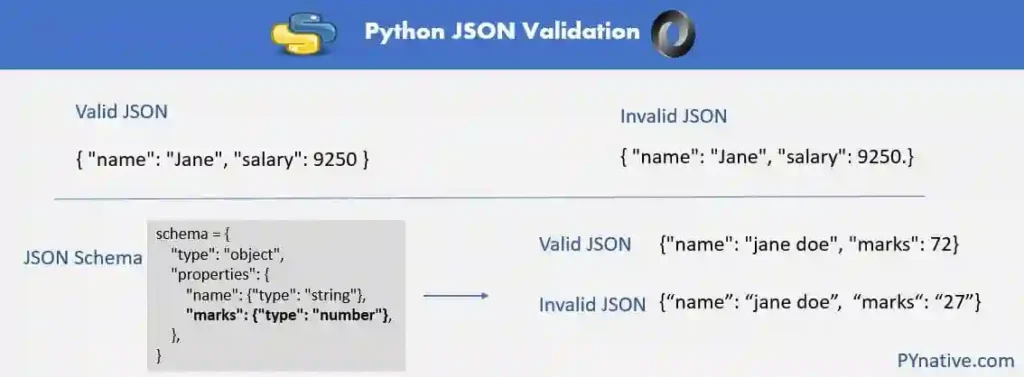
No — the built-in json module only checks that JSON is syntactically valid, not that it matches a specific structure (required fields, data types, and so on). Schema validation requires a separate library like jsonschema.
Why did json.dumps() raise a TypeError?
This happens when you try to serialize a Python object type that has no JSON equivalent — a custom class instance, a datetime object, or a set, for example. You’ll need to either convert it to a JSON-compatible type first (like a string) or provide a custom encoder function.
Can I validate JSON in Python without fully parsing it into memory?
Not with the standard library — json.loads() and json.load() both fully parse the input to validate it, since there’s no way to confirm JSON is well-formed without reading through its full structure. For very large files where memory is a concern, streaming JSON parsers like ijson exist as third-party alternatives.
Is Python’s JSON error message the same across Python versions?
The general behavior (raising JSONDecodeError with line/column info) has been stable for a long time, but the exact wording of error messages has changed slightly across Python versions. The line and column numbers themselves are reliable regardless of version.
Beyond Syntax Validation: JSON Schema
Everything above validates that your JSON is syntactically well-formed — but it doesn’t check whether the data matches a specific expected structure (required fields, correct types, and so on). For that, Python has a separate library, jsonschema, which validates JSON against a defined schema. That’s a large enough topic to deserve its own guide, but it’s worth knowing the two are different problems: syntax validation confirms the JSON is readable at all, while schema validation confirms it has the shape your application expects.
Summary
Python’s built-in json module covers parsing (loads/load), serializing (dumps/dump), and validation through JSONDecodeError, with no external dependencies needed for any of it. The error object’s .lineno and .colno attributes give you the same precision a browser-based validator provides, just accessible programmatically — which is exactly what you want when validation needs to run inside a script, test suite, or automated pipeline rather than a one-off manual check.



3 Comments