JSON Formatting for Git: Stable Output, Key Order, and Reviewable Diffs
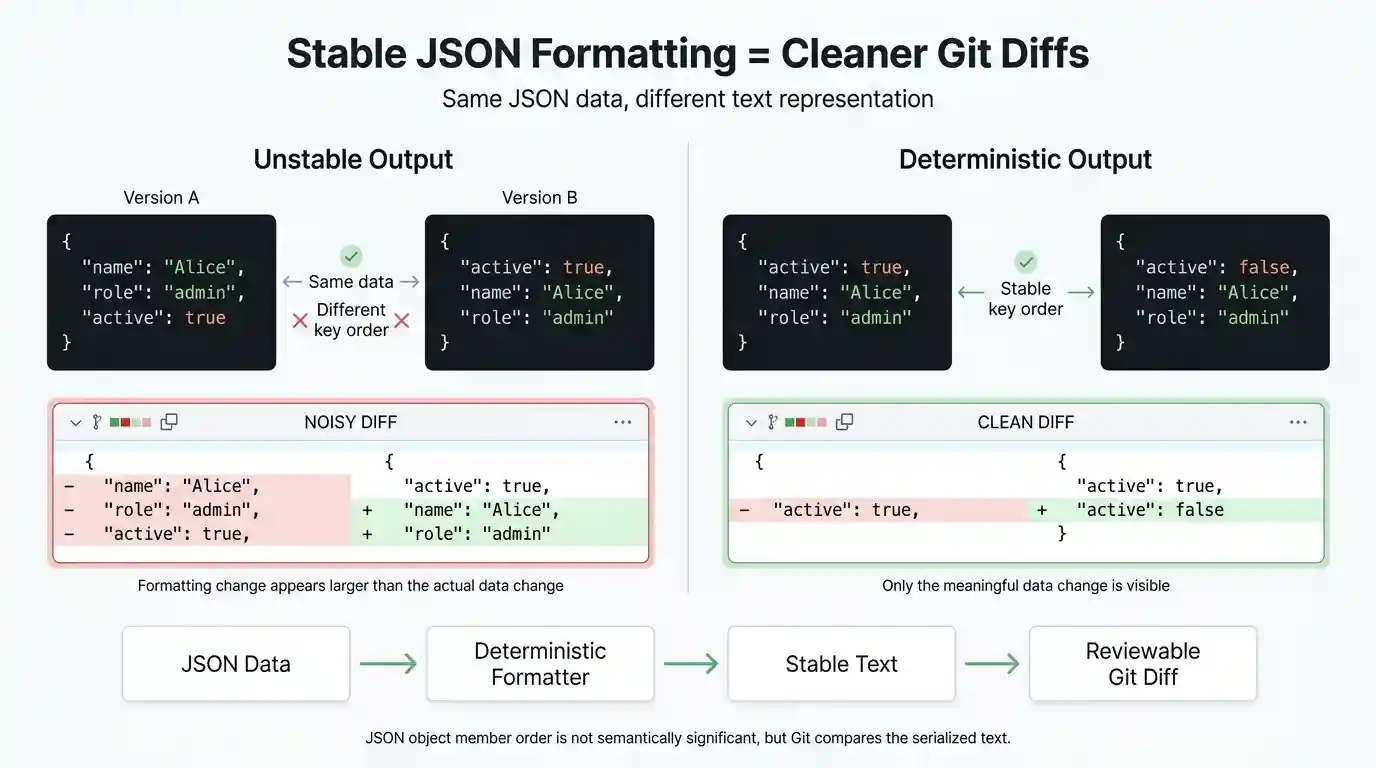
When tracking configuration files, state stores, or database backups in version control, standard JSON serialization is notoriously hostile to code reviews. Two JSON files can be completely identical in data structure—possessing absolute semantic equality—yet fail a code review entirely because text-level differences like randomized key ordering or mixed indentation trigger a massive, unreadable Git diff.
This guide covers why these serialization variances break line-by-line diff tools, how you can enforce deterministic JSON formatting, and how to configure Git workflows that separate automated formatting from strict repository enforcement.
Quick Diagnostic Reference Table
If your repository is struggling with noisy JSON diffs or merge conflicts, use this reference table to find the appropriate formatting strategy:
| Git Diff Symptom | Root Cause | Recommended Solution |
|---|---|---|
| Entire file marked as changed | Randomized key insertion order across different runtimes or machine environments | Sort object keys alphabetically during serialization |
| Single-line diff explosion | File was saved or committed in a minified, single-line format | Enforce consistent pretty-printing with 2-space indentation |
| “No newline at end of file” warnings | Missing trailing newline character at the end of the file | Configure editor or pre-commit hook to append a standard trailing newline |
| Formatting style arguments | Developers using conflicting IDE formatters | Implement an automated formatter paired with a pre-commit enforcer hook |
The Core Problem: Semantic Equality vs. Textual Equality
By definition under RFC 8259, JSON objects are strictly defined as unordered collections of name/value pairs. The specification itself does not mandate any property sorting order. However, version control systems operate on plain text, not parsed data structures.
When different backend languages, scripts, or runtime environments serialize data structures to disk, they often insert keys based on memory allocation, object creation history, or hash-table iteration order rather than a stable sequence. Consider two automated scripts generating an identical data payload:
{
  "id": 4021,
  "role": "admin",
  "username": "alex_dev"
}
{
  "username": "alex_dev",
  "id": 4021,
  "role": "admin"
}
Though these two files are semantically identical to a JSON parser, a standard line-by-line Git diff sees shuffled lines and flags the entire block as changed:
@@ -1,5 +1,5 @@
 {
-  "id": 4021,
-  "role": "admin",
-  "username": "alex_dev"
+  "username": "alex_dev",
+  "id": 4021,
+  "role": "admin"
 }
This diff explosion obscures genuine code changes and creates frustrating merge conflicts.
Step 1: Enforcing Deterministic Key Ordering
To keep Git diffs stable, you can enforce that serialization scripts sort object keys alphabetically before writing them to disk. Note that while object keys should be sorted, array element order must always be preserved because array indices carry distinct semantic significance.
Safe Stable Stringification in Node.js
When writing custom JavaScript serialization wrappers, ensure you target plain objects specifically rather than catching built-in types like Date or custom class instances:
function stableStringify(obj, indent = 2) {
    return JSON.stringify(obj, (key, value) => {
        // Target strictly plain objects to avoid mutating Dates or class instances
        if (value && Object.prototype.toString.call(value) === '[object Object]') {
            return Object.keys(value)
                .sort()
                .reduce((sorted, k) => {
                    sorted[k] = value[k];
                    return sorted;
                }, {});
        }
        return value;
    }, indent);
}
Stable Serialization in Python
Python’s built-in json module provides a direct parameter to handle this natively via sort_keys=True:
import json

config = {"role": "admin", "id": 4021, "username": "alex_dev"}

# sort_keys ensures deterministic diff output across commits
stable_output = json.dumps(config, indent=2, sort_keys=True)
print(stable_output)
Step 2: Configuring Git Attributes and Display Normalization
To give Git instructions on how to handle JSON files in your repository, you can configure both a .gitattributes tracking rule and a custom diff driver in your local or global .gitconfig file.
First, declare the attribute in your project’s root .gitattributes file:
*.json text diff=json
Next, configure a custom diff driver in your git configuration. Using `textconv` with a sorting utility like `jq` allows Git to perform display normalization—meaning it formats and sorts keys on-the-fly *only* while rendering terminal diffs, leaving the underlying file structure stored in the repository untouched:
[diff "json"]
    textconv = jq --sort-keys .
Step 3: Pairing Formatters with Pre-Commit Enforcers
A robust Git workflow relies on a clear division of labor: formatters should be the automatic fixers, while pre-commit hooks and CI pipelines act as the enforcers. If a pre-commit hook simply throws an error without fixing the file, developers face friction without an automatic path forward.
The following robust pre-commit script reads the staged version of the file directly from the Git index (avoiding working-tree drift), validates its syntax, and enforces that the staged content is fully sorted and formatted:
#!/bin/sh
# .git/hooks/pre-commit
# Validates and enforces sorted/formatted JSON on staged files

# Gather staged JSON files safely without subshell issues
files=$(git diff --cached --name-only --diff-filter=ACM | grep '\.json$')

if [ -z "$files" ]; then
    exit 0
fi

for file in $files; do
    # Fetch the exact staged version from the Git index
    staged_content=$(git show :"$file" 2>/dev/null)

    # 1. Check syntax validity of the staged content
    if ! node -e "JSON.parse(process.argv[1])" "$staged_content" >/dev/null 2>&1; then
        echo "Error: Invalid JSON syntax in staged file: $file"
        exit 1
    fi

    # 2. Compute the expected formatted and sorted structure via Node.js
    expected_content=$(node -e "
        const content = process.argv[1];
        const parsed = JSON.parse(content);
        function sortObj(o) {
            if (o && Object.prototype.toString.call(o) === '[object Object]') {
                return Object.keys(o).sort().reduce((s, k) => { s[k] = sortObj(o[k]); return s; }, {});
            }
            if (Array.isArray(o)) return o.map(sortObj);
            return o;
        }
        console.log(JSON.stringify(sortObj(parsed), null, 2));
    " "$staged_content")

    # Normalize line endings for comparison
    normalized_staged=$(printf "%s\n" "$staged_content" | tr -d '\r')
    normalized_expected=$(printf "%s\n" "$expected_content" | tr -d '\r')

    if [ "$normalized_staged" != "$normalized_expected" ]; then
        echo "Error: JSON file '$file' is not properly sorted or formatted."
        echo "Tip: Run your project's JSON formatter script before committing."
        exit 1
    fi
done

exit 0
If a teammate attempts to commit a JSON file with unsorted keys or broken syntax, the commit is aborted instantly with an explicit error message guiding them to run the formatter.
The Definitive Git JSON Checklist
Before pushing major JSON configuration assets or database schema dumps to a shared repository, run through this workflow to ensure clean pull requests:
- Validate Syntax First: Always run your files through a strict parser or paste them into our free online JSON formatter and validator to catch trailing commas or missing braces.
- Enable Key Sorting: Use
sort_keys=Truein Python or custom key-sorting reducers in JavaScript to guarantee stable property positioning. - Enforce Indentation: Standardize on a consistent layout (typically 2 spaces) rather than committing minified single-line blobs.
- Check Line Endings: Ensure your editor appends a standard trailing newline at the end of the file to prevent unnecessary Git diff warnings.
- Review the Staged Diff: Always run
git diff --cachedlocally to verify that only actual data changes appear highlighted before opening a pull request.