JSON Validation in CI/CD: Practical Workflows for Automated Checks
A single misplaced comma in a config.json file or a missing required property in an application configuration shouldn’t take down your deployment. Yet, because JSON is frequently edited by humans but consumed by strict automated systems, malformed payloads are a leading cause of deployment failures.
The solution is to shift validation left. By integrating JSON checks directly into your Continuous Integration and Continuous Deployment (CI/CD) pipelines, you can catch syntax errors and schema violations at the pull request stage—long before they reach staging or production.
The Crucial Difference: Syntax vs. Schema
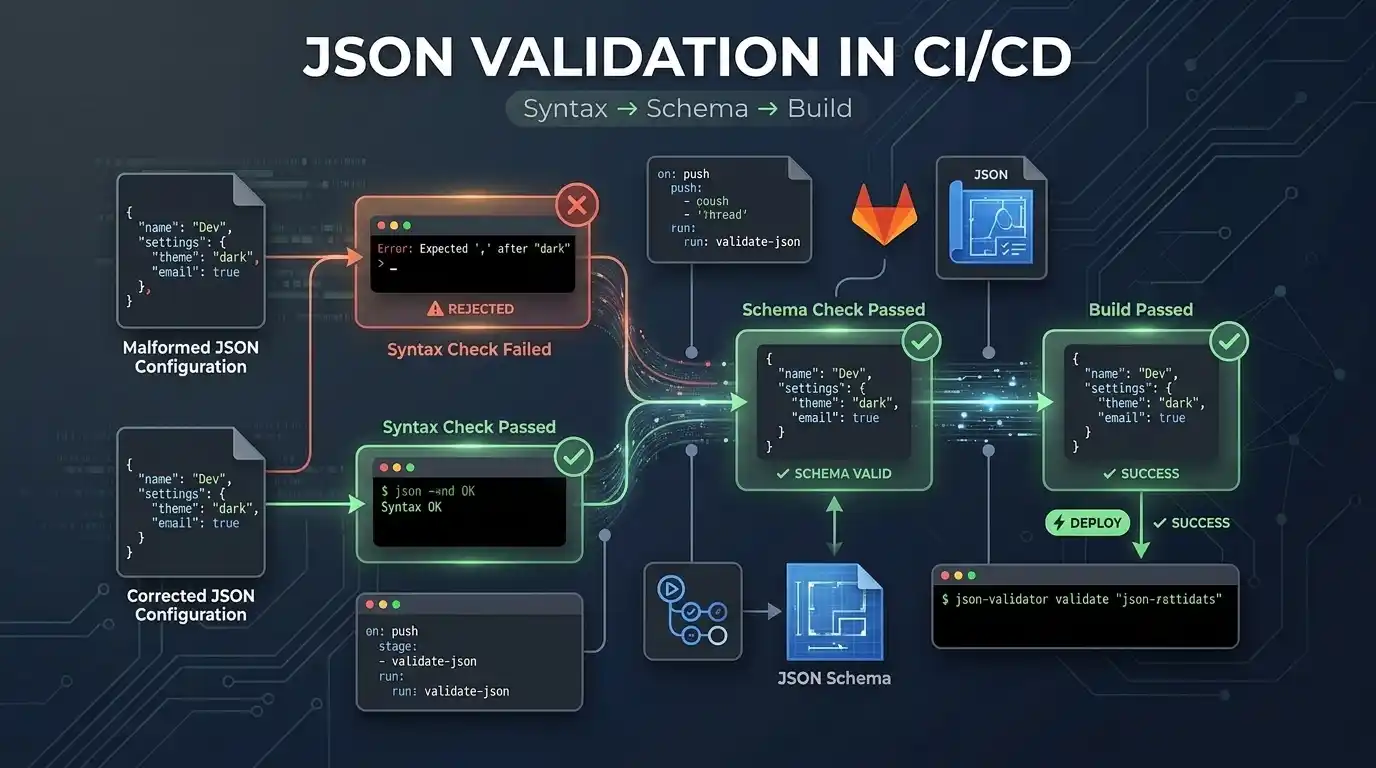
Before building automated workflows, it is important to understand that validating JSON happens in two distinct stages. A file can pass the first stage but fail the second.
- Syntax validation asks: “Is this valid JSON?” It ensures there are no trailing commas, unescaped quotes, or missing brackets.
- Schema validation asks: “Does this valid JSON have the structure and values my application expects?” It ensures required keys are present and data types (like integers vs. strings) are correct.
What CI/CD Validation Catches
Here is exactly how these two layers protect your deployments:
| Problem | Syntax Check | Schema Check |
|---|---|---|
| Missing comma | Yes | No |
| Trailing comma | Yes | No |
| Invalid JSON string | Yes | No |
| Missing required property | No | Yes |
| Wrong data type (e.g., string instead of int) | No | Yes |
| Invalid enum value | No | Yes |
| Value below minimum threshold | No | Yes |
Level 1: Basic Syntax Validation
The first line of defense is ensuring the file is structurally valid. The fastest way to check syntax in a Linux-based CI runner is using jq, a lightweight command-line JSON processor.
A robust script will find all JSON files in your repository and exit with a non-zero status code if any file is malformed, explicitly telling you which file failed:
find . -name "*.json" -print0 | while IFS= read -r -d '' file; do
  jq -e . "$file" >/dev/null || {
    echo "Invalid JSON: $file"
    exit 1
  }
done
Level 2: JSON Schema Validation
JSON Schema is a vocabulary that allows you to annotate and validate JSON documents. Using a tool like ajv-cli (Another JSON Schema Validator), you can enforce exact data structures in your pipeline.
First, define a schema (e.g., config-schema.json):
{
  "$schema": "http://json-schema.org/draft-07/schema#",
  "type": "object",
  "properties": {
    "environment": { "type": "string", "enum": ["dev", "staging", "prod"] },
    "timeout": { "type": "integer", "minimum": 1000 }
  },
  "required": ["environment", "timeout"]
}
Then, run ajv-cli to validate your configuration files against this schema:
npx ajv-cli validate -s config-schema.json -d "configs/*.json"
Shift Left: Pre-Commit Checks
While CI pipelines are essential, they shouldn’t be the first place developers discover malformed JSON. The most efficient workflow follows a logical progression: Editor → Local Check → Pull Request (CI) → Deployment.
Run the same validation locally before pushing a commit. You can manually test a single file from your terminal:
jq -e . config.json
Even better, integrate tools like Husky and lint-staged to automatically run these checks on every git commit, preventing broken syntax from ever leaving the developer’s machine.
Practical CI/CD Workflows
Here is how to implement these robust checks in popular CI/CD platforms.
GitHub Actions Workflow
Create a file at .github/workflows/json-validation.yml to automatically run syntax and schema checks every time a pull request is opened.
name: Validate JSON Files

on:
  pull_request:
    paths:
      - '**.json'

jobs:
  validate-json:
    runs-on: ubuntu-latest
    steps:
      - name: Checkout Code
        uses: actions/checkout@v4

      - name: Check JSON Syntax with jq
        run: |
          find . -name "*.json" -print0 | while IFS= read -r -d '' file; do
            jq -e . "$file" >/dev/null || {
              echo "Invalid JSON: $file"
              exit 1
            }
          done

      - name: Setup Node.js for AJV
        uses: actions/setup-node@v4
        with:
          node-version: '20'

      - name: Install AJV CLI
        run: npm install -g ajv-cli

      - name: Validate Configs against Schema
        run: ajv validate -s schemas/config-schema.json -d "configs/*.json"
GitLab CI Pipeline
For GitLab, you can achieve the exact same workflow in your .gitlab-ci.yml file:
stages:
  - validate

json_syntax_check:
  stage: validate
  image: alpine:latest
  before_script:
    - apk add --no-cache jq bash
  script:
    - |
      find . -name "*.json" -print0 | while IFS= read -r -d '' file; do
        jq -e . "$file" >/dev/null || {
          echo "Invalid JSON: $file"
          exit 1
        }
      done
  only:
    changes:
      - "**/*.json"

json_schema_check:
  stage: validate
  image: node:20-alpine
  script:
    - npm install -g ajv-cli
    - ajv validate -s schemas/config-schema.json -d "configs/*.json"
Handling CI/CD Validation Failures
When a pipeline fails because of a JSON error, developers need a fast way to find the exact syntax break or schema mismatch without waiting for another 5-minute CI run.
If your runner logs report an Invalid JSON error, do not try to manually scan large configuration files in your editor. Instead, copy the failing payload from the pull request and paste it directly into our JSON Formatter and Validator. The tool will instantly highlight the exact line and character causing the syntax break, allowing developers to push a rapid fix and get the build back to green.
Conclusion
Manual code reviews are an unreliable way to catch JSON errors. By enforcing automated syntax and schema validation in your CI/CD pipelines, you guarantee that malformed configurations are blocked at the pull request level. This simple shift reduces deployment anxiety, prevents production downtime, and keeps your team focused on shipping features rather than hunting down missing commas.