
JSON to Swift Codable: 7 Essential Tips to Avoid Errors
If you develop applications for iOS, macOS, watchOS, or tvOS, you will often need to exchange data with web servers and REST APIs. Most APIs use JSON to send information such as user profiles, product details, account data, and application settings.
Swift provides Codable, a convenient way to convert between JSON data and native Swift types. Instead of manually extracting values from dictionaries, you can define structures that represent the expected response and let JSONDecoder handle the conversion.
This guide explains how to convert JSON to Swift Codable models, map inconsistent key names, handle nested objects and arrays, decode dates, manage missing values, and troubleshoot common errors. It also covers the limitations of generating Swift models from a sample JSON response.
1. Understand the Codable Protocol
In Swift, Codable is a type alias that combines two protocols:
Decodableconverts external data into Swift types.Encodableconverts Swift values into an external representation, such as JSON.
When an API sends JSON to your application, you generally use Decodable through JSONDecoder. When you need to send a Swift model to a server, you can use Encodable with JSONEncoder.
A type that conforms to Codable supports both operations.
For example:
import Foundation

struct User: Codable {
    let id: Int
    let name: String
    let email: String
}
Swift can synthesize the required encoding and decoding implementation because the properties use types that already support Codable.
This approach reduces repetitive code and makes your data models easier to maintain. However, the model’s property types and expected JSON structure must still match the data returned by the API.
2. Convert Simple JSON to Swift Codable
Consider a JSON response containing a user’s account information:
{
  "id": 84729,
  "username": "developer_ninja",
  "isActive": true,
  "accountBalance": 150.75
}
Create a Swift structure with matching property names and compatible types:
import Foundation

struct UserProfile: Codable {
    let id: Int
    let username: String
    let isActive: Bool
    let accountBalance: Double
}
You can now decode the JSON string into a UserProfile instance.
let jsonString = """
{
  "id": 84729,
  "username": "developer_ninja",
  "isActive": true,
  "accountBalance": 150.75
}
"""

do {
    let jsonData = Data(jsonString.utf8)
    let decoder = JSONDecoder()

    let user = try decoder.decode(
        UserProfile.self,
        from: jsonData
    )

    print("Username: \(user.username)")
    print("Account balance: \(user.accountBalance)")
} catch {
    print("Decoding failed: \(error)")
}
JSONDecoder reads the JSON data, matches its keys to the model properties, and creates the corresponding Swift value. The do-catch block handles errors if the JSON is malformed or its structure does not match the model.
The basic rule is straightforward: property names must match the JSON keys unless you configure an appropriate mapping, and the data types must be compatible.
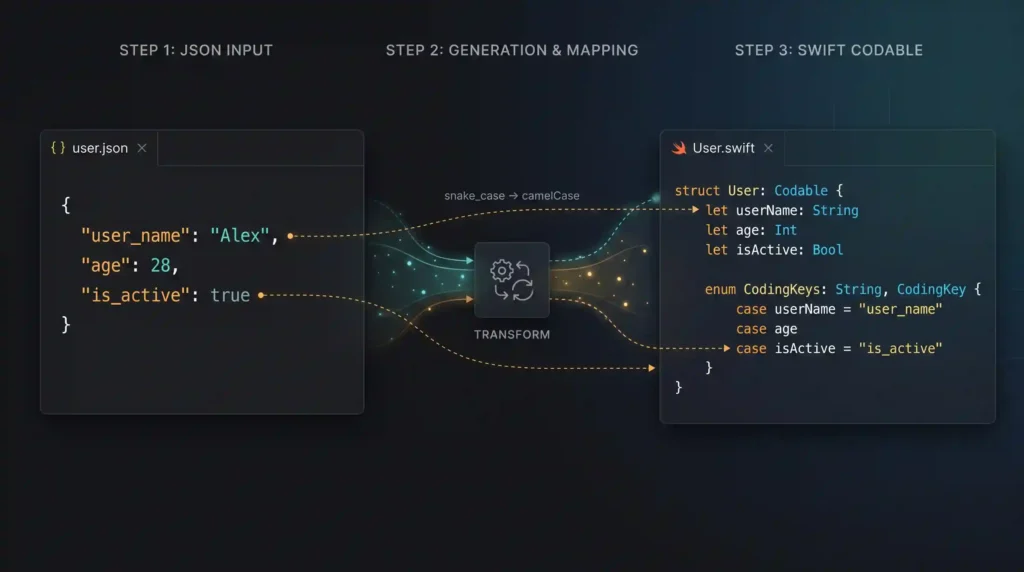
3. Handle Different JSON Key Names with CodingKeys
Many APIs use snake_case, while Swift properties commonly use camelCase.
For example, an API might return:
{
  "user_id": 443,
  "first_name": "Sarah",
  "subscription_tier": "Premium"
}
You can map these keys to more conventional Swift property names using CodingKeys.
struct Subscriber: Codable {
    let id: Int
    let firstName: String
    let subscriptionTier: String

    enum CodingKeys: String, CodingKey {
        case id = "user_id"
        case firstName = "first_name"
        case subscriptionTier = "subscription_tier"
    }
}
The decoder now knows which JSON key corresponds to each property.
When to use convertFromSnakeCase
If an API consistently uses snake_case, you can let JSONDecoder transform those keys automatically.
let decoder = JSONDecoder()
decoder.keyDecodingStrategy = .convertFromSnakeCase
With this strategy, a JSON key such as first_name can map to a Swift property named firstName.
However, this strategy is not a universal replacement for CodingKeys. Acronyms, unusual naming conventions, and custom property names may require explicit mappings. When using .convertFromSnakeCase, do not assume that raw snake_case values in CodingKeys will work unchanged, because the decoder transforms incoming keys before matching them.
Choose one approach based on the API’s naming conventions, and test it against the actual payload.
4. Model Nested JSON Objects and Arrays
Real API responses often contain several levels of objects and arrays. You can represent these relationships using separate Swift structures.
Consider this store response:
{
  "store_name": "Tech Gadgets Outlet",
  "location": "New York",
  "inventory": [
    {
      "product_id": "A100",
      "name": "Wireless Mouse",
      "price": 29.99
    },
    {
      "product_id": "A101",
      "name": "Mechanical Keyboard",
      "price": 89.50
    }
  ]
}
Create a model for the store and another for each product.
struct StoreResponse: Codable {
    let storeName: String
    let location: String
    let inventory: [Product]

    enum CodingKeys: String, CodingKey {
        case storeName = "store_name"
        case location
        case inventory
    }
}

struct Product: Codable {
    let productId: String
    let name: String
    let price: Double

    enum CodingKeys: String, CodingKey {
        case productId = "product_id"
        case name
        case price
    }
}
The inventory property is an array of Product values. Swift uses the Product structure to decode each object in that array.
You can access the decoded information like this:
let store = try decoder.decode(
    StoreResponse.self,
    from: jsonData
)

print(store.storeName)

for product in store.inventory {
    print("\(product.name): \(product.price)")
}
For larger responses, creating a model for each meaningful object usually makes the code easier to understand and test. If you only need one value from a deeply nested payload, a dedicated model may not always be necessary, but avoid replacing clear data models with complicated manual parsing without a good reason.
5. Decode Dates Using the Correct Strategy
JSON does not have a dedicated date data type. APIs commonly represent dates as strings, such as ISO 8601 timestamps, or as numeric Unix timestamps.
For example:
{
  "article_title": "Understanding Swift",
  "published_at": "2023-10-15T14:30:00Z"
}
You can represent the date as a Swift Date property:
struct Article: Decodable {
    let articleTitle: String
    let publishedAt: Date

    enum CodingKeys: String, CodingKey {
        case articleTitle = "article_title"
        case publishedAt = "published_at"
    }
}
Configure the decoder to handle the timestamp format:
let decoder = JSONDecoder()
decoder.dateDecodingStrategy = .iso8601
This works for supported ISO 8601 date representations, including the timestamp shown above. Do not assume it will handle every variation, particularly timestamps with fractional seconds or custom formatting. Test the strategy against the exact values returned by your API.
For a date string such as 2023-10-15, you can use a custom DateFormatter:
let formatter = DateFormatter()
formatter.locale = Locale(identifier: "en_US_POSIX")
formatter.timeZone = TimeZone(secondsFromGMT: 0)
formatter.dateFormat = "yyyy-MM-dd"

let decoder = JSONDecoder()
decoder.dateDecodingStrategy = .formatted(formatter)
The format string must match the input. For example, yyyy-MM-dd is appropriate for a year-month-day string, while a timestamp containing hours and minutes requires a different format.
If your API sends Unix timestamps as numbers, use .secondsSince1970 or .millisecondsSince1970, depending on the unit provided by the server.
6. Handle Missing Keys and Null Values
API responses do not always contain every possible field. A user may not have a nickname, a product may not have a discount, or an optional property may be omitted entirely.
Consider this JSON:
{
  "id": 101,
  "name": "John Doe",
  "nickname": null
}
A suitable Swift model is:
struct Employee: Decodable {
    let id: Int
    let name: String
    let nickname: String?
}
Swift’s synthesized decoding implementation can set nickname to nil when the key is absent or its value is null.
However, optional properties do not prevent every decoding error. If nickname contains a value of an incompatible type, decoding can still fail.
For non-optional properties, a missing key or a null value will generally cause decoding to fail. Therefore, choose optionality based on the API contract rather than making every property optional just to avoid errors.
You can also provide a default value after decoding when your application has a meaningful fallback. Do not silently replace required data with arbitrary defaults, because that can conceal problems in the API response.
7. Generate Swift Models and Troubleshoot Decoding Errors
Writing Codable structures by hand is useful for small responses and helps you understand the data model. For large JSON payloads, a code generator can save time by producing an initial set of Swift structures. If your application receives dates in different formats, see our guide to JSON date formatting for more information about handling date values consistently.
A typical JSON-to-Swift workflow is:
- Obtain a representative JSON response from the API.
- Validate the JSON before generating code.
- Generate Swift structures for the root object and nested objects.
- Review the inferred property types and key mappings.
- Test the generated models against real responses.
JSON to Swift Codable Generator
Paste a JSON object or array to generate Swift Codable models, including nested structures and CodingKeys.
Paste JSON and select Generate Swift.
Review before use: Property types are inferred from your sample. A sample cannot reveal every field an API may omit or return as null. Test generated models against real responses.
A generator can infer types from the supplied sample, but it cannot know every possible response the API might return. If a field is present in the sample but missing in another response, the generated non-optional property may fail to decode. Review optionality, date formats, and naming conventions before using generated code in an application.
Common Codable decoding errors
| Error | What it usually means | What to check |
|---|---|---|
keyNotFound | A required key is missing | Confirm the JSON key or use an appropriate optional property |
typeMismatch | The value has an incompatible type | Compare the JSON value with the Swift property type |
valueNotFound | A required value is missing or null | Check null values and model optionality |
dataCorrupted | The data cannot be decoded as expected | Check JSON validity and configured decoding strategies |
You can catch specific decoding errors to make debugging easier.
Before decoding a response, validate the JSON to catch syntax problems that would otherwise prevent Swift from parsing the data.
do {
    let result = try decoder.decode(
        MyModel.self,
        from: data
    )

    print(result)
} catch DecodingError.keyNotFound(let key, let context) {
    print("Missing key: \(key.stringValue)")
    print(context.debugDescription)
} catch DecodingError.typeMismatch(let type, let context) {
    print("Expected type: \(type)")
    print(context.debugDescription)
} catch DecodingError.valueNotFound(let type, let context) {
    print("Missing value for type: \(type)")
    print(context.debugDescription)
} catch DecodingError.dataCorrupted(let context) {
    print("Invalid or corrupted data")
    print(context.debugDescription)
} catch {
    print("Decoding failed: \(error)")
}
These messages help identify whether the issue lies in the model, the payload, or the decoder configuration.
Validate JSON before debugging your models
Not every decoding failure means your Swift structures are wrong. A server may return an HTML error page, an empty response, or incomplete data instead of the expected JSON.
If the data comes from an HTTP request, check the HTTP status code and inspect the response body before decoding it. A failed request should not automatically be treated as a Codable model problem.
For example, you can validate the JSON syntax separately:
do {
    _ = try JSONSerialization.jsonObject(
        with: data,
        options: [.fragmentsAllowed]
    )

    print("JSON syntax is valid")
} catch {
    print("Invalid JSON: \(error)")
}
This checks whether the data can be parsed as JSON, but it does not verify that the payload matches your Swift model. A syntactically valid JSON response can still contain missing keys or incompatible types.
If the JSON is malformed, use a JSON validator to identify syntax problems before investigating the Codable structures. If the JSON is valid, compare its actual structure with your model and review the decoding configuration.
Seven Practical Tips for Reliable JSON-to-Swift Conversion
Use these checks when implementing a new API integration:
- Match the property types to the payload. Do not declare a value as
Intif the API returns it as a string. - Map key names deliberately. Use
CodingKeysor.convertFromSnakeCaseaccording to the API’s conventions. - Model nested objects explicitly. Separate structures make complex responses easier to maintain.
- Choose optional properties carefully. Base optionality on the API contract and its possible responses.
- Match the date strategy to the exact format. Test fractional seconds, time zones, and Unix timestamp units when applicable.
- Inspect decoding errors. Use the specific
DecodingErrorcases to identify missing keys and type mismatches. - Test more than one sample response. Include null values, missing fields, empty arrays, and realistic API variations.
These practices make your JSON decoding code easier to debug and less dependent on assumptions about the data.
Frequently Asked Questions
What is the difference between Codable and Decodable?
Decodable supports converting external data into Swift values. Encodable supports converting Swift values into an external representation. Codable combines both protocols.
Can Swift automatically convert JSON into structs?
Swift can decode JSON into structures that conform to Decodable or Codable. It does not automatically design the model from arbitrary JSON. You must define the expected structure or use a generator to create an initial model.
Why does JSONDecoder report a typeMismatch error?
This usually means a JSON value does not match the expected Swift type. For example, a property declared as Int cannot decode a JSON string such as "84729" as an integer without additional conversion logic.
How do I handle snake_case JSON keys in Swift?
You can define a CodingKeys enum to map individual JSON keys to Swift properties. If the API consistently uses snake_case, .convertFromSnakeCase may handle the conversion automatically, provided the property names follow the expected transformation rules.
Can Codable handle nested arrays and objects?
Yes. You can represent nested objects with separate Decodable structures and arrays with collection types such as [Product]. The model must reflect the actual JSON hierarchy.
Does Codable handle missing keys automatically?
Not for every property. A synthesized optional property can decode a missing key as nil, but a missing required non-optional property generally causes decoding to fail. Custom decoding logic can be used when the API requires special behavior.
Conclusion
Converting JSON to Swift Codable models is a practical way to handle API data in Apple-platform applications. By defining appropriate Swift structures, mapping inconsistent keys, modeling nested responses, and configuring date decoding correctly, you can avoid much of the repetitive work involved in manual parsing.
The most important step is to understand the data your API actually returns. Use optional properties where the contract permits missing values, inspect decoding errors rather than guessing at their cause, and validate JSON syntax when a response looks suspicious.
For larger payloads, a JSON-to-Swift generator can speed up the initial model creation, but generated code still needs to be reviewed and tested against real responses. Combining generation tools with careful model design gives you a more reliable workflow for maintaining Swift applications that depend on JSON APIs.