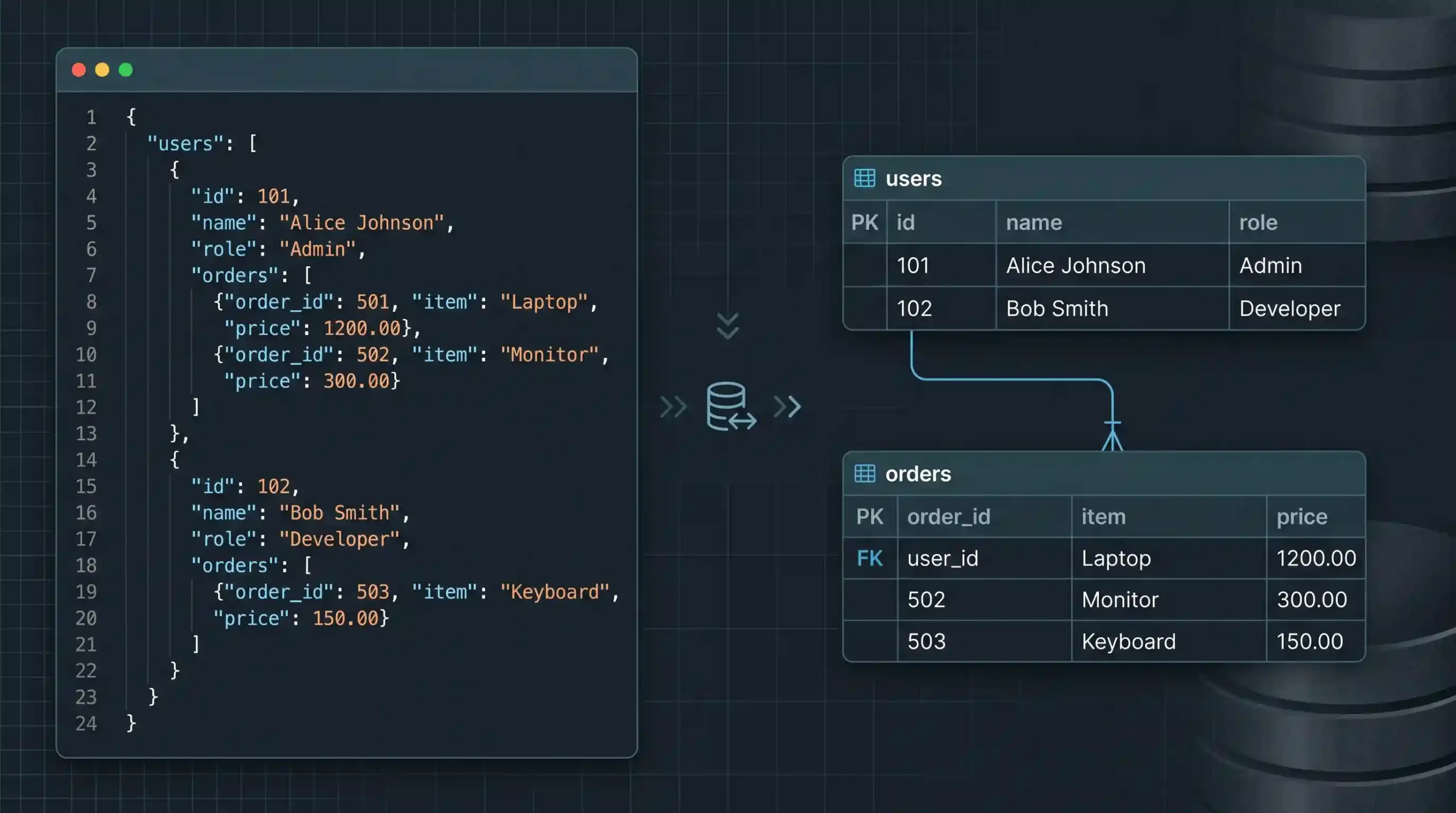
How to Convert JSON Data to SQL Tables and Rows
You’ve got JSON, usually from an API response or an export somewhere, and you need it sitting in actual database tables instead. This comes up constantly, and the honest answer depends a lot on whether your JSON is flat or nested. We tested both cases against a real PostgreSQL database rather than just describing the theory, so let’s walk through what actually works.
The Easy Case: Flat JSON
If every object in your JSON array has the same simple fields, no nesting, this is genuinely straightforward. PostgreSQL actually has a built-in function for exactly this, and it skips writing any application code at all.
CREATE TABLE users (id int PRIMARY KEY, name text, role text);

INSERT INTO users (id, name, role)
SELECT * FROM json_to_recordset('[
  {"id":1,"name":"Alex","role":"admin"},
  {"id":2,"name":"Sam","role":"editor"}
]') AS x(id int, name text, role text);
We ran this directly, and it works exactly as you’d hope:
 id | name |  role
----+------+--------
  1 | Alex | admin
  2 | Sam  | editor
json_to_recordset takes your JSON array and turns it directly into rows, right inside the SELECT, as long as you tell it what columns to expect and what types they are. If you’re already inside Postgres and your JSON is flat, this is often the least code you’ll ever write to solve this problem, and it’s worth knowing about even though most tutorials skip straight to writing a script for something the database can already do on its own.
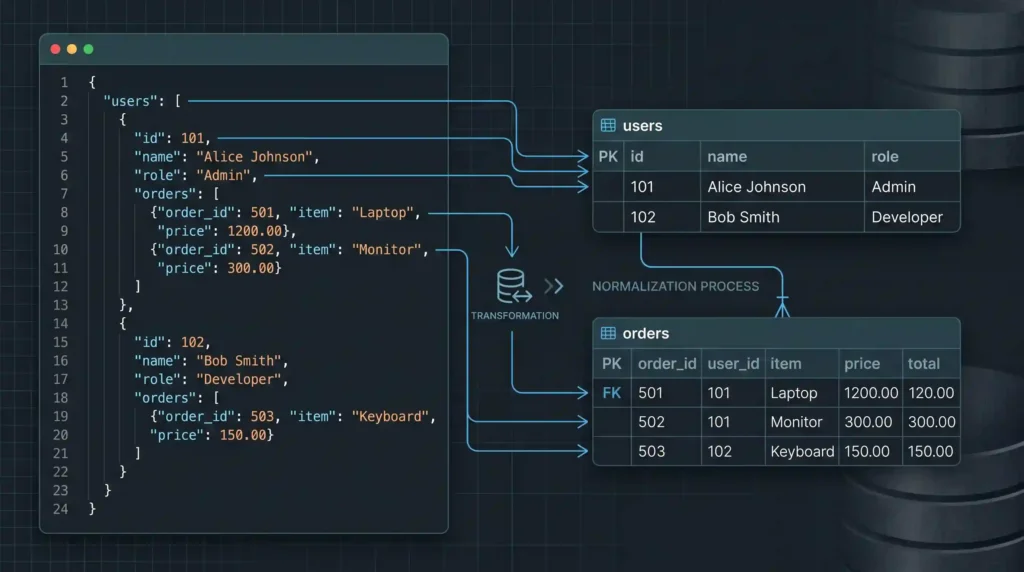
Why Nested JSON Isn’t the Same Problem
The moment your JSON has an array inside each object, things change. A relational database doesn’t have a column type for “a list of things,” at least not one you’d want to actually query against. The standard fix is splitting nested data into a separate table, connected back to the parent with a foreign key. This is normal relational design, not a JSON-specific workaround, but it’s worth walking through concretely.
Take a user with a list of orders:
[
  {
    "id": 1,
    "name": "Alex",
    "orders": [
      { "order_id": 101, "total": 49.99 },
      { "order_id": 102, "total": 12.50 }
    ]
  },
  {
    "id": 2,
    "name": "Sam",
    "orders": [
      { "order_id": 103, "total": 89.00 }
    ]
  }
]
That becomes two tables, not one:
CREATE TABLE users2 (id int PRIMARY KEY, name text);
CREATE TABLE orders (order_id int PRIMARY KEY, user_id int REFERENCES users2(id), total numeric);

INSERT INTO users2 (id, name) VALUES (1, 'Alex'), (2, 'Sam');
INSERT INTO orders (order_id, user_id, total) VALUES (101, 1, 49.99), (102, 1, 12.50), (103, 2, 89.00);
We confirmed the relationship actually holds up with a join:
SELECT u.name, o.order_id, o.total FROM users2 u JOIN orders o ON u.id = o.user_id ORDER BY o.order_id;
 name | order_id | total
------+----------+-------
 Alex |      101 | 49.99
 Alex |      102 | 12.50
 Sam  |      103 | 89.00
Every order correctly linked back to the right user. This is the pattern to reach for any time a JSON object contains an array of child records: one parent table, one child table, a foreign key connecting them.
Generating the SQL From Code
If you’re doing this from a script rather than by hand, the shape of the work is the same, you just build up the values programmatically before running the inserts.
data = [
    {'id': 1, 'name': 'Alex', 'orders': [{'order_id': 101, 'total': 49.99}, {'order_id': 102, 'total': 12.50}]},
    {'id': 2, 'name': 'Sam', 'orders': [{'order_id': 103, 'total': 89.00}]}
]

user_params = []
order_params = []
for user in data:
    user_params.append((user['id'], user['name']))
    for order in user['orders']:
        order_params.append((order['order_id'], user['id'], order['total']))
This gives you a clean list of tuples ready to insert, one loop through the parent records and one nested loop through each child array.
A Genuine Safety Point Worth Taking Seriously
Here’s the part that’s easy to get wrong if you’re building the SQL as a plain string instead of using parameters. Say a name field in your JSON contains something like this, whether by accident or on purpose:
unsafe_name = "Alex'; DROP TABLE users; --"
naive_sql = f"INSERT INTO users (id, name) VALUES (1, '{unsafe_name}')"
That produces:
INSERT INTO users (id, name) VALUES (1, 'Alex'; DROP TABLE users; --')
Look at what happened there. The single quote in the name closed the string early, and everything after it became part of the actual SQL command instead of data. This is the textbook SQL injection problem, and it’s exactly why the parameter-based approach shown earlier (%s placeholders with a separate tuple of values, or your database driver’s equivalent) matters, not just as a style preference.
The database driver handles the escaping correctly and never lets a data value get interpreted as part of the command. Building SQL strings by hand with JSON values dropped directly into them is a real risk the moment that JSON comes from anywhere outside your own full control, an API, a user-submitted form, an external partner.
When to Reach for a Library Instead
For anything beyond a one-off script, most languages have JSON-to-SQL or ORM-based tooling that handles the parent/child table splitting and parameterization automatically. Writing this by hand, like we did above, is worth understanding once so you know what these tools are actually doing under the hood, but for ongoing production work, a proper ORM or migration tool usually saves you from re-solving the same nested-data problem every time your JSON’s shape changes slightly.
Checking Your JSON Before Any of This
Malformed JSON fails in confusing ways once it’s tangled up with database code, since the error you see might come from your SQL layer instead of pointing clearly at the actual JSON problem. Running the source data through our JSON Formatter and Validator first, before writing a single line of conversion code, is worth the ten seconds it takes.
Frequently Asked Questions
-
Does json_to_recordset work in databases other than Postgres?
No, that specific function is Postgres-only. Other databases have their own equivalents. MySQL has
JSON_TABLE, SQL Server hasOPENJSON, each with its own syntax, so check your specific database’s documentation rather than assuming the syntax carries over. -
What if my JSON’s structure is inconsistent between records?
That’s a harder problem than what’s covered here, and usually means deciding on a canonical schema first, then handling missing or extra fields explicitly, rather than expecting an automatic conversion to guess correctly.
-
Is it ever fine to build SQL strings manually instead of using parameters?
Only if every single value is a fixed, hardcoded constant you wrote yourself, never actual data from JSON, a user, or an API. The moment external data is involved, parameterized queries are the safe default, not an optional extra step.
-
Should I always split nested arrays into separate tables?
For data you’ll query relationally, yes, that’s the standard approach. If you genuinely just need to store the nested structure as-is without querying into it much, a
jsonbcolumn holding the whole nested object is sometimes the simpler, more appropriate choice instead.
Summary
Flat JSON converts to SQL rows easily, and Postgres’s own json_to_recordset can often do it without any application code at all, as we confirmed directly. Nested JSON needs to be split into parent and child tables connected by a foreign key, which we also tested end to end with a working join. The one thing worth taking seriously regardless of which path you use: build your inserts with parameterized queries, not string concatenation, since JSON values you don’t fully control can otherwise break out of the SQL you thought you were writing.