

JSON Lint vs JSON Validate: What’s the Difference?
In the development world, the terms “linting” and “validating” are often used interchangeably—especially when developers talk about checking their JSON files. However, in automated deployment pipelines and strict codebases, they serve two very different purposes.
Is JSON linting the same as JSON validation?
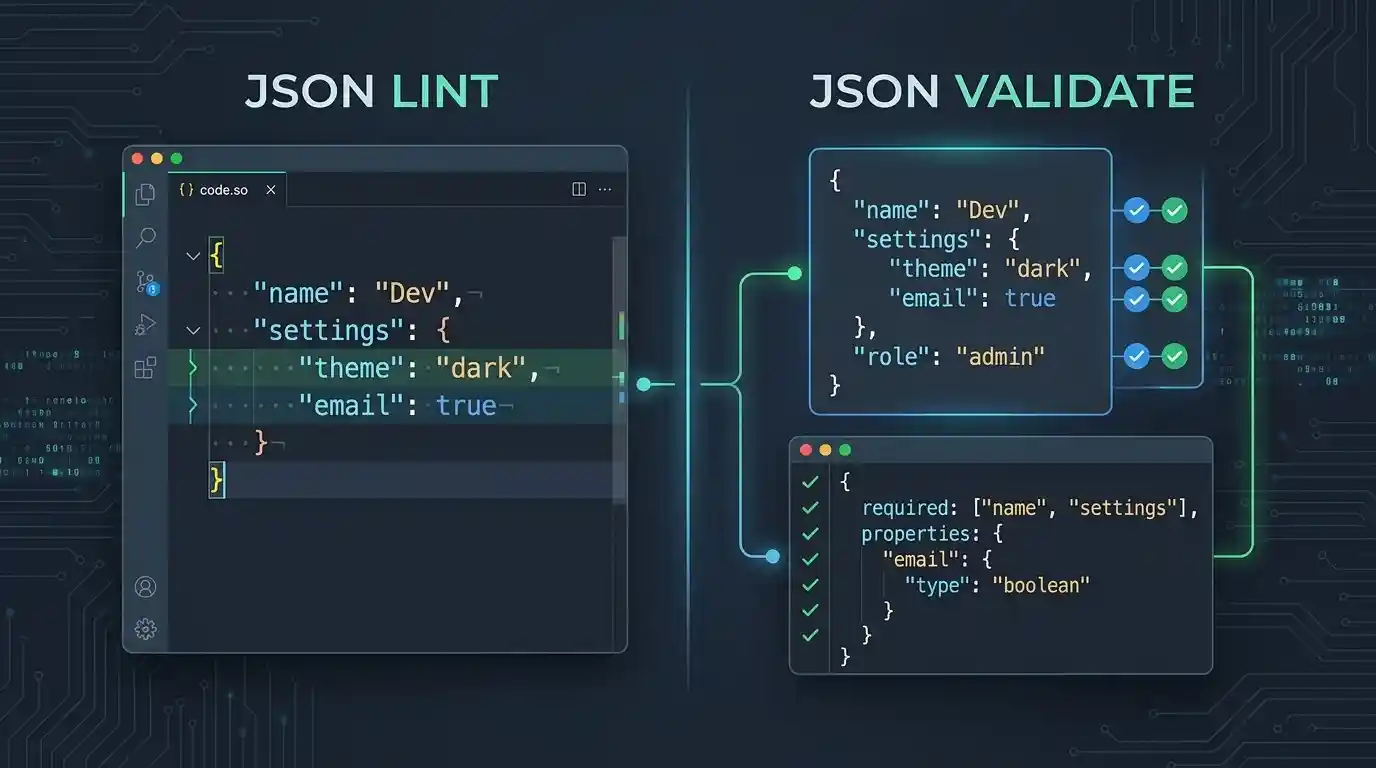
No. They overlap in everyday conversation because many tools marketed as “JSON linters” primarily just detect syntax errors. Technically, however, linting focuses on style, consistency, and potential problems, whereas validation focuses on whether data conforms to a strict syntax specification or a predefined schema.
Quick Comparison Table
Use this reference table to understand the core differences between linting and validating JSON data:
| Feature | JSON Linting | JSON Validation |
|---|---|---|
| Primary Goal | Code style, conventions, and identifying potential problems | Data conformity, structural integrity, and syntax correctness |
| Scope of Check | Indentation, spacing, duplicate keys, project-specific rules | Syntax rules (RFC 8259) or Schema constraints (data types/required keys) |
| Typical Tooling | ESLint (with JSON plugins), Prettier | JSON.parse(), jq (syntax), AJV (schema) |
| Pipeline Impact | Fails the build if code is messy or violates team conventions | Fails the build if the data is fundamentally broken or structurally incorrect |
What is JSON Validation?
Validation asks a binary question: “Does this data conform to the required rules?”
JSON Validation generally operates on one of two levels, depending on your context:
- Syntax Validation: The parser checks if the file strictly adheres to the core JSON specification defined in RFC 8259. If the parser finds a trailing comma, a missing closing bracket, or single quotes instead of double quotes, the file is entirely invalid JSON. Standard parsers like
JSON.parse()or CLI tools likejqperform this basic check to see if a string can be parsed at all. - Schema Validation: The parser checks the shape of the data against a completely separate specification called a JSON Schema. Even if the syntax is perfectly legal JSON, the schema validator will fail the payload if a required key like
"database_url"is missing, or if a port number is passed as a string ("8080") instead of an integer (8080). Tools like AJV are designed specifically for schema validation.
Example of a Syntax Validation Error:
{
  "host": "localhost",
  "port": 3306,
}
Validator response: SyntaxError: Unexpected token } in JSON at position 42. (The trailing comma violates the RFC 8259 syntax standard).
What is JSON Linting?
Linting asks a qualitative question: “Does this valid code meet our team’s formatting standards and avoid suspicious patterns?”
The term “lint” comes from C programming, referring to tools that flag suspicious usage and style errors. A JSON Linter ensures that your configuration files are readable, consistent, and maintainable across your engineering team. A file can be perfectly valid JSON but still fail a linting check.
A JSON Linter enforces rules such as:
- Ensuring exactly 2 spaces or 4 spaces of indentation.
- Flagging duplicate object keys. While RFC 8259 dictates that object names should be unique, it primarily describes parser behavior when duplicates occur. Duplicate keys can lead to unpredictable or implementation-dependent behavior across different systems, so linters flag them as a potential problem.
- Ensuring the file ends with a single empty newline character.
Example of a Linting Error:
{
    "version": 1.0,
  "name": "Kingstools"
}
Linter response: With a strict two-space indentation rule configured, a linter might report Error: Expected indentation of 2 spaces but found 4 spaces on line 2. (The JSON is completely valid and parseable, but fails the project’s style rules).
Why Do Developers Confuse the Two?
The confusion stems from historical naming conventions. The most famous early tool for checking JSON syntax was a web application called JSONLint. Because of its massive popularity, developers started using “linting JSON” as a catch-all verb for “finding syntax errors in JSON.”
Today, many online tools branded as “Linters” are actually strictly Syntax Validators under the hood. However, inside your IDE (like VS Code) or your CI/CD pipelines, linting and validating are usually handled by completely separate software packages.
How to Use Both in Your Workflow
For a robust engineering workflow, you should employ both concepts simultaneously:
1. Linting for the Developer
Integrate a tool like Prettier or ESLint (with eslint-plugin-jsonc) into your code editor. When you hit save on a package.json or a custom config file, Prettier will automatically format indentation and whitespace, while additional tools or plugins can enforce key ordering. This ensures every developer commits code that looks identical.
2. Validation for the Pipeline
When you upload code to your repository, the Continuous Integration/Continuous Delivery (CI/CD) process must perform a rigorous validation step. Using tools such as jq (for syntax validation) or ajv (for schema conformance verification), the process ensures the complete integrity of the raw data structure before the application attempts to deploy or ingest it.
Test Your Payloads Instantly
If you’re staring at a corrupted configuration file and need to figure out if it’s a syntax error, a schema mismatch, or just disorganized formatting, don’t manually search for it..
Attach your load to our site JSON formatter and validator. It functions as a quick JSON syntax validation and formatting engine – instantly highlighting syntax breaks, marking invalid symbols, and automatically reordering data to clean up messy formatting with a single click.

One Comment