JSON in PHP: json_encode, json_decode, and Common Pitfalls
PHP has had built-in JSON support since PHP 5.2, through two core functions: json_encode() and json_decode(). They’re straightforward to use for basic cases, but PHP’s specific quirks around error handling, null ambiguity, and array-versus-object encoding cause more production bugs than the simplicity of the functions would suggest. This guide covers both functions in depth, along with the pitfalls that trip up even experienced PHP developers.
Every example below was actually run against PHP 8.3 to confirm real output, not written from memory.
json_decode(): JSON String to PHP Value
json_decode() converts a JSON string into a PHP value. By default, it returns objects (instances of stdClass) for JSON objects — but passing true as the second argument returns associative arrays instead:
$json = '{"name": "Kings Tools", "free": true, "version": 2}';

$asObject = json_decode($json);
echo $asObject->name;        // Kings Tools (property access)

$asArray = json_decode($json, true);
echo $asArray['name'];       // Kings Tools (array key access)
Most PHP codebases lean toward the associative array form (json_decode($json, true)) since it integrates more naturally with PHP’s array functions, but either is valid — the choice mostly comes down to whether the rest of your code expects objects or arrays.
json_encode(): PHP Value to JSON String
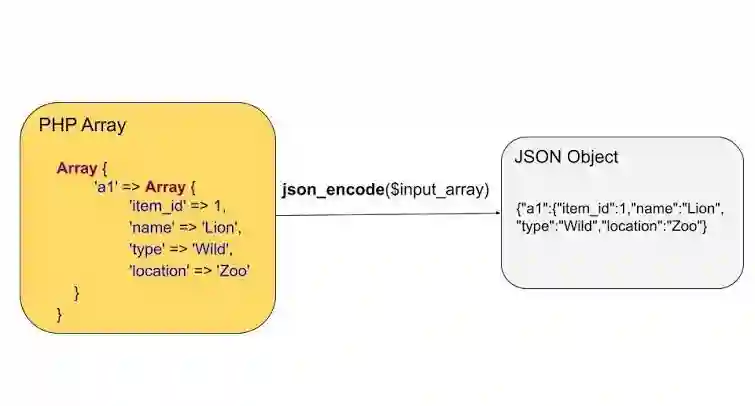
Going the other direction, json_encode() converts a PHP array or object into a JSON string:
$data = ['tool' => 'formatter', 'modes' => ['beautify', 'minify'], 'free' => true];

echo json_encode($data);
// {"tool":"formatter","modes":["beautify","minify"],"free":true}
For readable, indented output, pass the JSON_PRETTY_PRINT flag:
echo json_encode($data, JSON_PRETTY_PRINT);
{
    "tool": "formatter",
    "modes": [
        "beautify",
        "minify"
    ],
    "free": true
}
Pitfall #1: The null Ambiguity
This is arguably the most dangerous default behavior in PHP’s JSON handling, and it catches people out constantly. json_decode() returns null both when the JSON is invalid and when the JSON legitimately contains the value null:
$bad = '{"name": "Kings Tools", "version": 2,}'; // invalid — trailing comma
$result = json_decode($bad);
var_dump($result); // NULL

$validNull = json_decode('null');
var_dump($validNull); // also NULL — but this JSON was perfectly valid!
If your code checks if ($result === null) to detect a parsing failure, it will incorrectly treat legitimately-null JSON the same as broken JSON. The correct way to actually detect a parse failure is to check json_last_error() separately, not just inspect the return value:
$result = json_decode($bad);
if (json_last_error() !== JSON_ERROR_NONE) {
    echo "Error: " . json_last_error_msg(); // Error: Syntax error
}
Understanding exactly what kind of syntax mistake triggers this is worth a closer look — our guide to the most common JSON errors walks through the ten patterns (trailing commas being the single most frequent one, as shown in this exact example) that cause json_decode() to fail like this.
Pitfall #2: Silent Failure Without JSON_THROW_ON_ERROR
By default, json_decode() fails silently — it doesn’t throw an exception or a warning, just returns null and sets an internal error flag you have to remember to check. Since PHP 7.3, you can opt into exception-based error handling instead, which is far less easy to accidentally ignore:
try {
    json_decode($bad, false, 512, JSON_THROW_ON_ERROR);
} catch (JsonException $e) {
    echo "JsonException caught: " . $e->getMessage();
    // JsonException caught: Syntax error
}
This is generally the safer pattern for new code — it makes JSON errors impossible to silently ignore, the way relying on a manually-checked error flag does not.
Pitfall #3: Sequential vs. Associative Array Encoding
PHP arrays don’t distinguish between “lists” and “maps” the way many other languages do — but JSON does (arrays vs. objects), and json_encode() has to guess which one you mean based on your array’s keys:
$sequential = ['a', 'b', 'c'];
echo json_encode($sequential);
// ["a","b","c"]  <- encoded as a JSON array, as expected

$nonSequential = [0 => 'a', 2 => 'b']; // note: key 1 is missing
echo json_encode($nonSequential);
// {"0":"a","2":"b"}  <- encoded as a JSON object, likely NOT what you wanted
If your array’s keys aren’t a clean, gapless sequence starting at 0, json_encode() silently switches to producing a JSON object with string keys instead of the array you probably expected. This commonly happens after using array_filter() or unset() on an array, since both operations can leave gaps in the numeric keys without you necessarily noticing. The fix is usually to re-index with array_values() before encoding, if you specifically need a JSON array.
Pitfall #4: Empty Arrays vs. Empty Objects
A related ambiguity: PHP’s empty array [] has no way to indicate whether it should become an empty JSON array [] or an empty JSON object {} — by default, it always becomes []:
echo json_encode([]);
// []

echo json_encode((object)[]);
// {}

echo json_encode([], JSON_FORCE_OBJECT);
// {}
If an API you’re building needs to guarantee an empty object rather than an empty array (some client-side code distinguishes between the two), you need to explicitly cast to (object) or use the JSON_FORCE_OBJECT flag — PHP won’t infer your intent from an empty array alone.
Pitfall #5: The Default Nesting Depth Limit
json_decode() has a default maximum nesting depth of 512 levels, controlled by its third argument. This is rarely hit in practice, but deeply recursive or auto-generated JSON can occasionally exceed it:
$shallow = json_decode('{"a":{"b":{"c":{"d":1}}}}', true, 2);
var_dump($shallow); // NULL
echo json_last_error_msg(); // Maximum stack depth exceeded
If you’re intentionally parsing deeply nested JSON and hitting this, increase the depth argument — but a null result here is another reminder of why checking json_last_error() matters, since this failure looks identical to any other decode failure from the return value alone.
Pitfall #6: Unicode Characters Get Escaped by Default
By default, json_encode() escapes non-ASCII characters into \uXXXX sequences — valid JSON, but not always what you want for readability:
$data = ['city' => 'Lahóre', 'note' => 'café'];

echo json_encode($data);
// {"city":"Lah\u00f3re","note":"caf\u00e9"}

echo json_encode($data, JSON_UNESCAPED_UNICODE);
// {"city":"Lahóre","note":"café"}
If your output needs to stay human-readable rather than escaped, add the JSON_UNESCAPED_UNICODE flag.
Frequently Asked Questions
Should I use objects or associative arrays when decoding JSON in PHP?
There’s no strict rule — associative arrays (json_decode($json, true)) tend to feel more natural for typical PHP array-handling code, while objects preserve a slightly closer structural mapping to the original JSON. Pick whichever matches how the rest of your codebase handles data, and stay consistent within a project.
Does json_encode() support objects with private or protected properties?
By default, only public properties are included when encoding a PHP object. To control serialization of private/protected properties, implement the JsonSerializable interface on your class and define a jsonSerialize() method that returns the data you want encoded.
What does JSON_ERROR_NONE mean?
It’s the value json_last_error() returns when the most recent json_encode()/json_decode() call succeeded with no error — this is what you’re checking for (or checking against) to confirm an operation actually worked.
Can json_decode() handle very large JSON files efficiently?
json_decode() loads the entire JSON into memory at once, which is fine for typical API responses and config files but can be memory-intensive for very large files (many megabytes). For genuinely large JSON, a streaming parser like JsonMachine (a separate Composer package) processes data incrementally instead of loading everything at once.
Why does my API return 0 instead of false for a boolean field?
This usually isn’t a JSON issue at all — it’s a sign that a value was cast to an integer somewhere in your PHP code before encoding, since PHP’s loose typing allows false and 0 to be used somewhat interchangeably in certain contexts. Double-check the value’s type immediately before it’s passed to json_encode().
A Quick Way to Sanity-Check Your JSON First
Several of the pitfalls above only surface once JSON is already broken in a way that’s hard to spot by eye, especially in a large payload. Running suspicious JSON through a dedicated JSON formatter and validator before it ever reaches your PHP code is often faster than debugging a silent null return after the fact — it’ll show you exactly which line and character triggered the failure, which json_last_error_msg() alone doesn’t always make obvious.
Summary
PHP’s json_encode() and json_decode() are simple on the surface, but several default behaviors — silent null returns, the array/object encoding ambiguity, and Unicode escaping — are common sources of real bugs. The single most valuable habit is checking json_last_error() explicitly (or using JSON_THROW_ON_ERROR for exception-based handling) rather than trusting a null return value alone, since null in PHP’s JSON functions is genuinely ambiguous between “this failed” and “this JSON legitimately contained null.”