JSON vs JSONB in PostgreSQL: 8 Real Differences We Tested (Don’t Guess Wrong)
Picking between json and jsonb in Postgres feels like it shouldn’t matter much. They both hold JSON data, right? We spun up a real PostgreSQL instance and ran the actual comparisons instead of just repeating what everyone else says, and it turns out the choice matters more than you’d think. Here are the 8 differences that actually showed up when we tested them, storage size included, since that one gets skipped a lot.
1. JSON Keeps Your Exact Formatting. JSONB Doesn’t.
Insert the same messy JSON into both column types, and you’ll get two very different things back.
CREATE TABLE test1 (data_json json, data_jsonb jsonb);
INSERT INTO test1 VALUES ('{"b": 1,   "a": 2}', '{"b": 1,   "a": 2}');
SELECT data_json, data_jsonb FROM test1;
     data_json      |    data_jsonb
--------------------+------------------
 {"b": 1,   "a": 2} | {"a": 2, "b": 1}
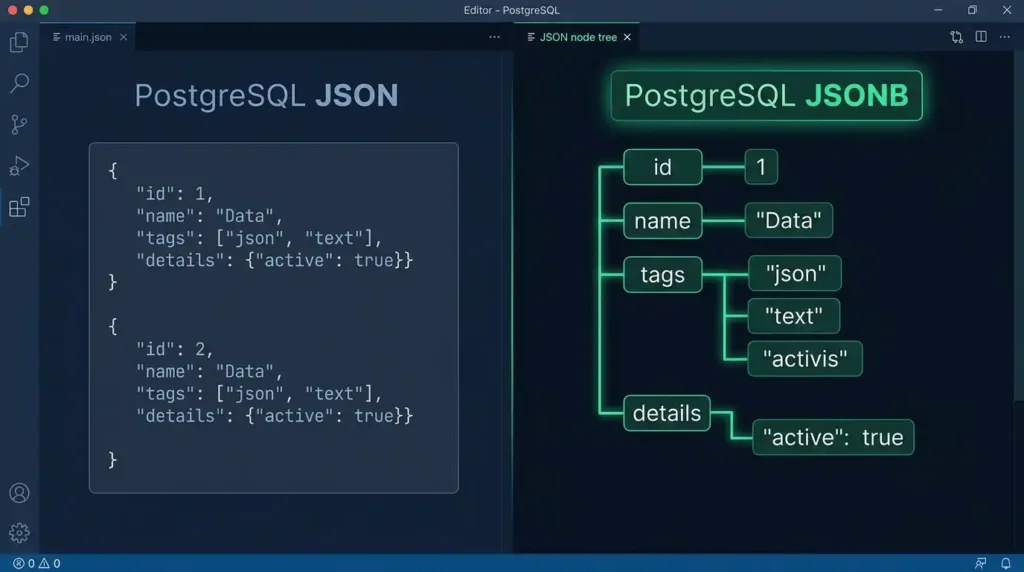
See that? The json column gave us back the exact text we put in, extra spaces and all. The jsonb column reformatted it completely and reordered the keys while it was at it. This is the core thing to understand before anything else on this list makes sense: json is basically a text field with a validity check. jsonb actually parses your data into a different internal structure.
2. JSONB Usually Takes Up More Disk Space, Not Less
You’d think stripping all that whitespace would make jsonb smaller. We tested it, and it’s actually the opposite, more often than not.
SELECT pg_column_size('{"id":1,"name":"user1","tags":["a","b","c","d","e"],"active":true,"score":50}'::json) AS json_bytes,
       pg_column_size('{"id":1,"name":"user1","tags":["a","b","c","d","e"],"active":true,"score":50}'::jsonb) AS jsonb_bytes;
 json_bytes | jsonb_bytes
------------+-------------
         81 |         128
That’s the same compact document, no whitespace to strip on either side, and jsonb still came out about 58% bigger. We even tried it with a heavily indented version of the same document, giving json every chance to lose on whitespace alone. jsonb still won out at 128 bytes against json‘s 106. Turns out the binary format’s internal overhead (offsets and length markers for every key, so it can jump straight to any value without re-parsing) costs more than the whitespace ever saved. Scaled up across a full 50,000-row table, the gap held steady: 5.7 MB for json versus 8 MB for jsonb, roughly 40% more.
Worth knowing, but rarely a dealbreaker. Disk is cheap. Query speed usually isn’t, which is where jsonb earns that space back and then some, as you’ll see in a minute.
3. Duplicate Keys Survive in JSON. JSONB Just Picks One.
This one genuinely surprised us a little, even knowing it was coming.
CREATE TABLE test2 (data_json json, data_jsonb jsonb);
INSERT INTO test2 VALUES ('{"a": 1, "a": 2}', '{"a": 1, "a": 2}');
    data_json     | data_jsonb
------------------+------------
 {"a": 1, "a": 2} | {"a": 2}
json stored both duplicate keys, exactly as typed. jsonb quietly kept only the last one and threw the first away. If your data source occasionally sends duplicate keys (badly-behaved APIs do this more often than you’d hope), that’s silent data loss you’d never notice with jsonb unless you went looking for it.
There’s an actual fix here, not just something to worry about. If an upstream source might send duplicate keys and you need to keep both values, either land the raw payload in a json audit column first so nothing’s lost, or restructure the field into an array before it ever touches jsonb — turn {"a": 1, "a": 2} into {"a": [1, 2]} at the application layer, and there’s nothing left for jsonb to silently drop.
That kind of malformed or duplicate-key input is exactly what’s worth catching before it reaches your database at all. Running incoming payloads through our JSON Formatter and Validator first — checking for trailing commas, malformed syntax, or accidental duplicate keys — beats finding out about the problem after jsonb has already quietly resolved it for you.
4. Key Order Survives in JSON. JSONB Sorts It.
CREATE TABLE test3 (data_json json, data_jsonb jsonb);
INSERT INTO test3 VALUES ('{"z": 1, "a": 2, "m": 3}', '{"z": 1, "a": 2, "m": 3}');
        data_json         |        data_jsonb
--------------------------+--------------------------
 {"z": 1, "a": 2, "m": 3} | {"a": 2, "m": 3, "z": 1}
Same story as the formatting test. json kept z, a, m in the order we wrote them. jsonb alphabetized everything to a, m, z. Doesn’t matter for most use cases since JSON objects aren’t supposed to rely on key order anyway, but if some downstream system of yours does (it shouldn’t, but you know how that goes), this’ll bite you.
5. JSONB Can Be Indexed With GIN. JSON Can’t.
We tried building a GIN index on both column types.
CREATE INDEX idx_jsonb_gin ON test4 USING GIN (data_jsonb);
-- CREATE INDEX (works fine)

CREATE INDEX idx_json_gin ON test5 USING GIN (data_json);
-- ERROR: data type json has no default operator class for access method "gin"
Not a subtle difference. It just flat out refuses. If you ever want fast lookups into your JSON data rather than scanning every row, json isn’t even in the running.
6. The Containment Operator Only Works on JSONB
Related to the indexing thing, but worth calling out on its own because it’s such a common query pattern.
SELECT '{"a":1,"b":2}'::jsonb @> '{"a":1}'::jsonb;
-- t (true)

SELECT '{"a":1,"b":2}'::json @> '{"a":1}'::json;
-- ERROR: operator does not exist: json @> json
@> asks “does this JSON contain that JSON as a subset.” It’s genuinely useful for filtering rows, and it simply doesn’t exist for the json type.
7. JSON Is Faster to Insert
Here’s where it gets interesting, because this is the one place json actually wins. We inserted 50,000 rows of realistic-ish data into each column type and timed it.
INSERT into json column:  72.431 ms
INSERT into jsonb column: 149.100 ms
Roughly twice as slow for jsonb. Makes sense once you know why: json just checks that your text is valid JSON and stores it as-is. jsonb has to actually parse it and rebuild it into its binary format, every single insert. That work costs time.
8. JSONB Gets Dramatically Faster to Query, Especially With an Index
Here’s the payoff for that extra insert cost, and it’s worth being precise about which scenario we’re measuring, since the gap changes a lot depending on it.
Without any index, filtering on a nested field, jsonb already beats json just by skipping the text re-parse:
Sequential scan, json column:  44.494 ms
Sequential scan, jsonb column: 10.365 ms
Roughly 4 to 5 times faster. That’s the baseline advantage jsonb gets for free.
Add a GIN index, and the gap opens up a lot further. We ran a selective query (one matching about 1% of rows) against an indexed jsonb column and confirmed with EXPLAIN that Postgres was actually using the index, not scanning:
Indexed jsonb query (warm):        0.808 ms
json column, same filter, no index: 40.432 ms
That’s roughly 50 times faster with the index in play, and we’d expect that gap to widen further as a table grows into the millions of rows, since json has no indexing option at all and stays stuck doing a full text-parsing scan no matter how big the table gets. jsonb with a GIN index barely notices the difference.
So Which One Should You Actually Use?
Honestly, for almost everything, jsonb wins. You’re going to read your data a lot more often than you write it in most applications, and that’s exactly the trade-off jsonb is built for: pay a bit more at insert time and a bit more in disk space, get a lot back every time you query, especially once you add an index. Add in the containment operator support, and it’s not really close.
json still has a place if you genuinely need to preserve the exact original text, byte for byte, including duplicate keys or specific formatting, and you’re rarely going to query into the structure anyway. That’s a narrow case. Postgres’s own documentation nudges you toward jsonb for most new work too, and after actually running these numbers, it’s easy to see why.
Frequently Asked Questions
Can I convert an existing json column to jsonb later?
Yes, with ALTER TABLE your_table ALTER COLUMN your_column TYPE jsonb USING your_column::jsonb. Postgres will rewrite every row, so expect it to take a while on a large table.
Does jsonb lose any actual data, or just formatting?
Just formatting, whitespace, and key order, plus deduplicating repeated keys as shown above. The actual values you care about come through intact, as long as you didn’t need to keep those duplicates — and if you do, the array-restructuring fix above handles that.
Is jsonb always the right default for a new project?
For the vast majority of cases, yes. Unless you have a specific reason to need json‘s exact-text-preservation behavior, jsonb‘s query performance and indexing support make it the safer default, even with the modest storage and insert-speed trade-off.
Do other databases have this same json vs jsonb split?
Not exactly this same split. MySQL, for instance, only has one native JSON type that behaves more like Postgres’s jsonb internally. This particular two-type decision is fairly specific to Postgres.
Summary
We tested all eight of these directly instead of taking anyone’s word for it: json keeps your exact formatting, duplicate keys, and original key order, and it’s about twice as fast to insert with a smaller disk footprint. jsonb reformats and dedupes on the way in, costs more storage, but is 4-5x faster to query even unindexed, and roughly 50x faster once a GIN index is in play, a gap that only widens as your data grows. For most real applications, that read-speed advantage is worth far more than what you save on writes and disk space.