JSON vs XML: Which Should You Use in 2026?
JSON and XML both solve the same basic problem — structuring data so it can be stored, transmitted, and read by different systems — but they solve it in very different ways. If you’re choosing a format for a new API, a config file, or a data export, the decision usually comes down to a handful of practical trade-offs rather than one format being objectively “better.” This guide compares JSON and XML directly, with real examples, so you can make that call based on your actual use case.
JSON vs XML at a Glance
| JSON | XML | |
|---|---|---|
| Full name | JavaScript Object Notation | eXtensible Markup Language |
| Syntax style | Key-value pairs, brackets | Tags, elements, attributes |
| Readability | Compact, easy to scan | Verbose, more ceremony |
| Data types | Native (string, number, boolean, null, object, array) | Everything is text by default |
| Comments | Not supported | Supported |
| Schema validation | JSON Schema | XML Schema (XSD), more mature |
| Namespaces | Not supported | Supported |
| Common use today | REST APIs, config files, web apps | Enterprise systems, SOAP, document markup |
What Is XML?
XML represents data using nested tags, similar in spirit to HTML:
<person>
  <name>Alex</name>
  <age>29</age>
  <isActive>true</isActive>
</person>
XML predates JSON by several years and was the dominant format for web services throughout the 2000s, particularly through SOAP-based APIs. It’s still heavily used today in enterprise systems, document formats (like Microsoft Office’s .docx and .xlsx, which are XML under the hood), and industries with long-established XML-based standards.
What Is JSON?
JSON represents the same data using key-value pairs and brackets:
{
  "name": "Alex",
  "age": 29,
  "isActive": true
}
JSON emerged in the early 2000s as a lighter alternative, derived from JavaScript object syntax, and has since become the default format for REST APIs, web application data, and most modern configuration files. If you’re working with JSON regularly, our JSON Formatter and Validator is worth bookmarking — it catches syntax errors and lets you beautify or minify JSON instantly, directly in your browser.
XML vs JSON: A Side-by-Side Example
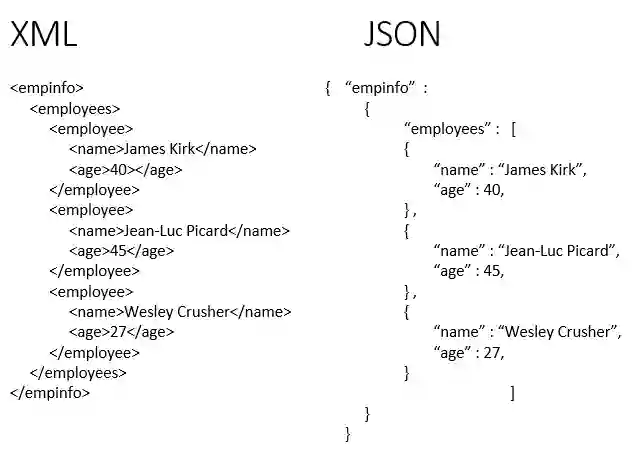
Here’s the same data — a list of two users — represented in both formats, which makes the difference between json and xml immediately visible:
XML:
<users>
  <user>
    <name>Alex</name>
    <role>admin</role>
  </user>
  <user>
    <name>Sam</name>
    <role>editor</role>
  </user>
</users>
JSON:
{
  "users": [
    { "name": "Alex", "role": "admin" },
    { "name": "Sam", "role": "editor" }
  ]
}
The JSON version is roughly half the character count and doesn’t require closing tags for every value — this size and readability gap is the single biggest reason JSON has overtaken XML for most modern use cases.
Key Differences Between JSON and XML
Verbosity. XML’s opening and closing tags for every element add significant weight to the file size, especially at scale. JSON’s bracket-based syntax is inherently more compact.
Data types. JSON has native support for strings, numbers, booleans, null, objects, and arrays — a parser knows immediately that 29 is a number and true is a boolean. XML has no native data types; everything is text by default, and the receiving application has to know to interpret <age>29</age> as a number rather than a string.
Arrays. JSON has a dedicated array syntax ([ ]) for ordered lists. XML has no equivalent — representing a list means repeating a tag multiple times (as shown in the <user> example above), which is less explicit about “this is a list” than JSON’s brackets.
Comments. XML supports <!-- comments -->. Standard JSON has no comment syntax at all, which can be a genuine inconvenience for hand-edited config files (though JSON5 and JSONC exist as extensions that add comment support).
Namespaces. XML supports namespaces, letting you combine elements from different vocabularies in a single document without naming conflicts. JSON has no equivalent mechanism — this is one of the few structural capabilities XML has that JSON simply doesn’t.
Schema validation. Both formats support schema validation — XML Schema (XSD) is a mature, well-established standard, while JSON Schema is newer but has grown into a solid, widely-supported alternative for the same purpose.
Advantages of JSON Over XML
For most modern development, JSON has real, practical advantages:
- Smaller payloads — less data transmitted over the network, which matters for API performance and mobile data usage
- Native language support — nearly every modern programming language can parse JSON with a single built-in function call, no external library required
- Easier for humans to read and write — less visual noise, especially in deeply nested structures
- Direct compatibility with JavaScript — since JSON syntax is derived from JavaScript object literals, it requires no translation layer in frontend web development
These are the reasons JSON has become the default choice for REST APIs, replacing the XML-heavy SOAP APIs that dominated a decade ago — api json vs xml is barely a contest for new projects today, with JSON as the near-universal default.
Where XML Still Wins
Despite JSON’s dominance, XML isn’t obsolete, and there are real scenarios where it remains the better choice:
- Document-centric data — XML was designed for marking up documents (think structured text with mixed content), which is genuinely awkward to represent in JSON
- Namespaces — when combining data from multiple vocabularies or standards in one document, XML’s namespace support has no JSON equivalent
- Mature enterprise tooling — many enterprise systems, especially in finance, healthcare, and government, have decades of XML-based infrastructure (and regulatory requirements) that aren’t going anywhere soon
- XSLT transformations — XML has a dedicated, powerful transformation language (XSLT) for converting XML into other formats, with no direct JSON equivalent of comparable maturity
So while asking why json is better than xml is a fair question for a typical web API, framing it as JSON being universally superior misses these genuine, still-relevant use cases.
JSON vs XML Performance
In practice, JSON generally performs better than XML for typical web and API use cases, for two main reasons: smaller payload size (less data to transmit and parse) and faster native parsing in most languages, since JSON’s simpler grammar is computationally cheaper to parse than XML’s tag-based structure. For very large documents or scenarios requiring streaming/partial parsing, both formats have specialized tools (like SAX parsers for XML, or streaming JSON parsers), so the performance gap narrows somewhat at scale — but for typical API payload sizes, JSON’s advantage is real and measurable.
JSON vs XML vs YAML
YAML is worth a brief mention alongside this comparison, since it’s a third format solving similar problems. YAML uses indentation instead of brackets or tags, making it even more compact and human-readable than JSON for configuration files — but that same indentation-based syntax makes it more sensitive to formatting errors than either JSON or XML. For APIs specifically, the comparison rarely includes YAML at all — it’s almost exclusively a JSON vs XML decision, with YAML reserved for config files and infrastructure-as-code tooling.
JSON Schema vs XML Schema
Both formats support formal schema validation — checking that a document matches a required structure, not just that it’s syntactically valid. XML Schema (XSD) has been standardized and mature for longer, with broader tooling support in enterprise environments. JSON Schema is younger but has matured significantly and is now well-supported across most major programming languages and API frameworks, making schema validation a solved problem in either format today.
Similarities Between JSON and XML
For all their differences, JSON and XML share the same core purpose and several structural similarities: both are text-based, human-readable (to varying degrees), hierarchical formats that support nested structures, both are platform- and language-independent, and both are widely supported by parsing libraries across virtually every programming language in active use.
Frequently Asked Questions
What is the difference between JSON and XML in one sentence?
JSON uses compact key-value syntax with native data types, while XML uses verbose tag-based markup with everything represented as text by default.
Which is better, XML or JSON?
Neither is universally better — JSON is generally the better choice for REST APIs, web applications, and configuration files, while XML remains preferable for document-centric data, namespace-heavy use cases, and established enterprise systems with existing XML infrastructure.
Can I convert XML to JSON, or JSON to XML?
Yes, conversion between the two is a well-solved problem, with libraries available in virtually every programming language. The conversion isn’t always perfectly lossless, though — XML features like attributes, namespaces, and mixed content don’t map cleanly onto JSON’s simpler structure.
Do REST APIs still use XML in 2026?
Some do, particularly in enterprise and legacy systems, or industries with regulatory standards built around XML. But for new API development, JSON is overwhelmingly the default choice.
Is JSON always smaller than the equivalent XML?
Almost always, yes, due to XML’s tag-based overhead — though the exact size difference depends on how deeply nested and attribute-heavy the specific data is.
Summary
JSON and XML both remain relevant in 2026, but for different reasons — JSON’s compactness and native data types make it the practical default for REST APIs, web applications, and most new projects, while XML’s namespace support, document-handling capabilities, and mature enterprise tooling keep it firmly in place for the systems already built around it. The right choice comes down to what you’re actually building, not which format is trendier.